
ModsJava
Client-Side WorldEdit
Brings WorldEdit functionality to the client by sending /setblock and /fill commands to the server. Currently in alpha.
⬇ Download on Modrinth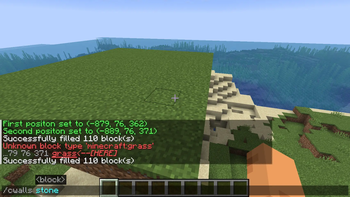
Client-Side WorldEdit
Brings WorldEdit functionality to the client by sending vanilla /setblock and /fill commands to the server. Requires operator permissions.
To avoid conflicts with existing WorldEdit installations on servers, commands are slightly renamed.
Supported Commands
| WorldEdit | Client-Side Equivalent |
|---|---|
//pos1 |
/cp1 |
//pos2 |
/cp2 |
//set |
/cset <block> <mode> |
//walls |
/cwalls <block> <mode> |
//sphere |
/csphere <radius> <block> <mode> |
//hsphere |
/chsphere <radius> <block> <mode> |
//cyl |
/ccyl <radius> <height> <block> <mode> |
//pyramid |
/cpyr <size> <block> <mode> |
//hcyl |
/chcyl <radius> <height> <block> <mode> |
//hpyramid |
/chpyr <size> <block> <mode> |
//copy |
/ccopy |
//paste |
/cpaste |
//stack |
/cstack <times> <direction> |
//center |
/ccenter |
- Note: This mod isn't an addon, it does not need WorldEdit to be installed.
Quick facts
- Edition: Minecraft Java
- File type: .jar
- Minecraft version listed: 1.21.11
- How to install: Install the matching mod loader (Forge, Fabric or NeoForge) for your Minecraft version. → Download the .jar. → Put it in the .minecraft/mods folder and launch that loader profile.
- Where to get it: Opens on Modrinth — not every file is mirrored on our own servers.
Install steps are the general flow for this file type — How to install Minecraft Java mods & modpacks walks through it step by step.
Verified by MCModsHub
- Ships as client-side-world-edit-mc1.21.11-v1.0.3.jar — drop this file into the mods folder
- Download size: 15 KB
- Download link checked 7 Sept 2026 — working
These come from our own check of the pack file, not from the source page.