
In-Game Music Player
I don't know my version or loader
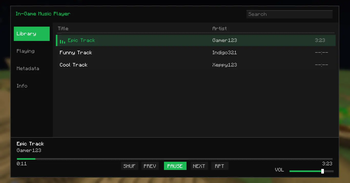
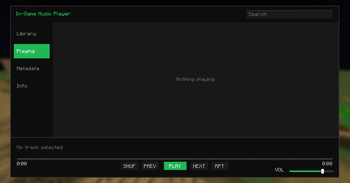
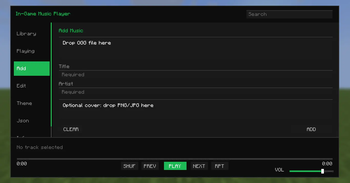
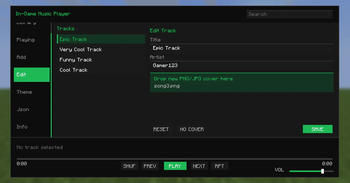
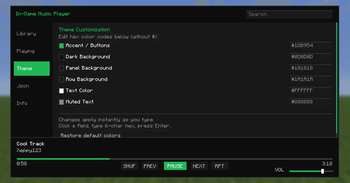
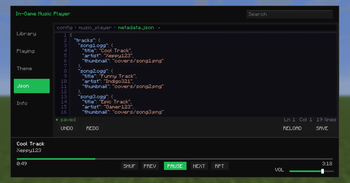
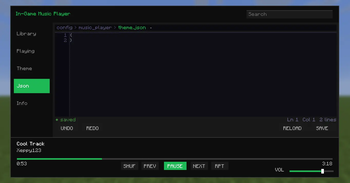
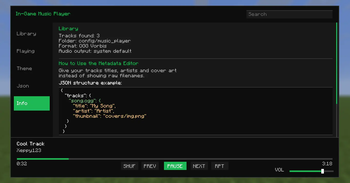

Listen to your favorite local tracks directly inside Minecraft! This mod adds a sleek, fully functional, and highly customizable music player GUI right into your game. Import your music, manage your library, and customize your experience entirely in-game—no file browsing or game restarts required.
✨ Features
Advanced Themeable GUI: Features a clean interface with Library, Now Playing, and Editor tabs. Personalize your setup using an interactive Theme Presets complete with Minecraft color presets. You can independently customize fine details like selected highlights, drag-and-drop areas, content backgrounds, and hover colors to perfectly match your HUD.
Supports
.ogg&.mp3: Enjoy full native support for both OGG and MP3 audio formats, making it effortless to bring your existing music collection straight into Minecraft.Full Lyrics Support: Bring your tracks to life with dedicated lyrics display directly in the Playing tab. Easily add or edit lyrics within the UI, or quickly drop them in using text files.
In-Game File Importing: Add tracks directly through the game interface. No need to manually navigate config folders or open your file explorer.
Instant In-Game Editor: Take full control of your library. Rename song titles, edit artist names, modify lyrics, and assign cover art thumbnails instantly from the UI or via the upgraded metadata/theme JSON editor.
Seamless Desktop Integration: Includes real PC clipboard support for all GUI textboxes, enabling easy copy-pasting from websites. Standard keyboard shortcuts are fully supported across all editors (search, add, edit, lyrics, hex fields, and JSON).
Global Keybind Access: Open the music player or bind menus from absolutely any screen or menu layout—no need to be loaded into a world map to change your settings.
Live File Scanning: If you add music externally, the mod automatically detects newly added files while Minecraft is running.
Full Playback Controls: Includes everything you need—play, pause, skip, previous, repeat, and shuffle.
Seek & Independent Volume: Drag the progress bar to seek through tracks and control the music player's volume independently from Minecraft’s master volume.
Performance Optimized: Engineered with low memory pressure for handling exceptionally large audio tracks and optimized image processing to ensure high-resolution cover arts load safely without stuttering your game.
⚙️ How to Use & Setup
🎮 Easy Way (In-Game)
- Launch Minecraft and open the music player using your configured keybind (set in Controls).
- Drag and drop your
.oggor.mp3files into the Add tab to import instantly. - Open the Editor tab to rename songs, edit artists, and assign cover images directly from the GUI.
📂 Manual Setup (Optional)
Prefer managing files yourself? You still can:
- Navigate to
config/music_player - Place your
.oggand/or.mp3files into the folder. - Place cover images inside
config/music_player/covers/ - Place track lyrics text files inside
config/music_player/lyrics/
- Place track lyrics text files inside
- Optionally edit
metadata.jsonto customize titles, artists, and thumbnails.
Example metadata.json:
{
  "tracks": {
    "song1.ogg": {
      "title": "Cool Track",
      "artist": "Xeppy123",
      "thumbnail": "covers/song1.png",
      "lyrics": "lyrics/song1.txt"
    },
    "song2.mp3": {
      "title": "Funny Track",
      "artist": "Indigo321",
      "thumbnail": "covers/song2.png"
    },
    "song3.ogg": {
      "title": "Epic Track",
      "artist": "Gamer123",
      "thumbnail": "covers/song3.png",
      "lyrics": "lyrics/song3.txt"
    }
  }
}
📌 Upcoming Features
This mod is actively being developed—expect more features, quality-of-life improvements, and customization options in future updates.
Next on the roadmap is moving beyond local files to bring online streaming straight to your in-game player:
- YouTube Music Streaming: Stream tracks and playlists directly from YouTube in-game without needing to download any files. (lavaplayer)
- SoundCloud Integration: Play your favorite SoundCloud tracks, artists, and mixes natively while you play.
- Edition: Minecraft Java
- File type: .jar
- Minecraft versions listed: 1.19.1, 1.19.2
- How to install: Install the matching mod loader (Forge, Fabric or NeoForge) for your Minecraft version. → Download the .jar. → Put it in the .minecraft/mods folder and launch that loader profile.
- Where to get it: Opens on Modrinth — not every file is mirrored on our own servers.
Install steps are the general flow for this file type — How to install Minecraft Java mods & modpacks walks through it step by step.
- Ships as ingame-music-player-1.19.1-1.19.2-1.0.1.jar — drop this file into the mods folder
- Download size: 224 KB
- Download link checked 5 Sept 2026 — working
These come from our own check of the pack file, not from the source page.