
ModsJava
CloudTweak
Adds a clean in-game PC overlay for Cobblemon with bulk selection, sorting, filtering, and priority-based Pokémon management.
⬇ Download on Modrinth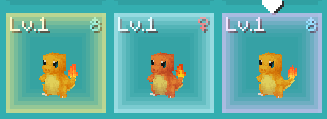
CloudTweak
CloudTweak is a Cobblemon quality-of-life add-on that helps make large PC boxes easier to manage.
It adds a clean overlay inside the Cobblemon PC with tools for searching, selecting, moving, sorting, releasing, highlighting, and setting up Pasture breeding pairs.
Features
PC Management
- Search through your PC boxes
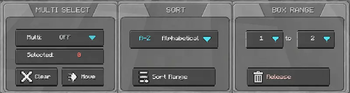
- Select multiple Pokémon at once
- Shift-click to select a range
- Move selected Pokémon to another box
- Release selected Pokémon with a confirmation popup
- Helps protect special Pokémon from bulk release:
- Shiny Pokémon
- Legendary Pokémon
- Mythical Pokémon
- Ultra Beasts
- Highlight important Pokémon:
- Shiny Pokémon
- 100% IV Pokémon
- Shiny + 100% IV Pokémon
- Saves your settings after restarting the game
Sorting
- Sort Pokémon inside a custom box range
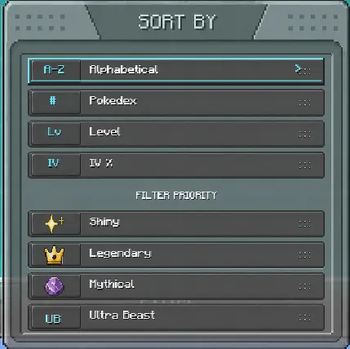
- Sort by:
- Name
- Pokédex number
- Level
- IV percentage
- Put important Pokémon first with priority filters:
- Shiny Pokémon
- Legendary Pokémon
- Mythical Pokémon
- Ultra Beasts
Pasture Mode
- Switch between PC Sort Mode and Pasture Mode
- Create breeding pairs directly from the PC
- Paired Pokémon show a P# label
- Pair Assist helps find matching partners
- Supports:
- Same species pairs
- Shared egg group pairs
- Ditto pairs
- Optional 100% IV Pair Filter
- Shows a red ! when a Pokémon cannot be paired
- Auto Pasture can help send queued pairs
- If a pair returns to your PC after relogging or pasture changes, CloudTweak can help bring that pair back into the queue
- Clean Cobblemon-style Pasture UI
How To Use
Sorting Pokémon
- Open the Cobblemon PC.
- Use PC Sort Mode.
- Select the Pokémon or box range you want to organize.
- Choose a sort option.
- Press Sort Range.
Moving Pokémon
- Select the Pokémon you want to move.
- Press Move.
- Go to the target box.
- Press Place.
Releasing Pokémon
- Select the Pokémon you want to release.
- Press Release.
- Confirm the release popup.
Special Pokémon such as Shiny, Legendary, Mythical, and Ultra Beast Pokémon are skipped for safer bulk release.
Creating Pasture Pairs
- Open the Cobblemon PC.
- Switch to Pasture Mode.
- Click two compatible Pokémon to create a pair.
- The pair will show a P# label.
- Use Auto Pasture if you want queued pairs to be sent more easily.
Pair Assist
- Turn Pair Assist ON.
- Click the Pokémon you want to pair.
- CloudTweak will show matching partners in a temporary PC view.
- Click the partner you want to use.
100% IV Pair Filter
- Open Pair Option.
- Turn 100% IV ON.
- Pair Assist will only show 100% IV partners from the available matches.
Purpose
CloudTweak is made for players with large Cobblemon PC collections who want an easier way to organize, sort, manage, and breed Pokémon without going box by box manually.
Verified by MCModsHub
- Ships as CloudTweak-1.3.2.jar — drop this file into the mods folder
- Download size: 3.8 MB
- Download link checked 3 Sept 2026 — working
These come from our own check of the pack file, not from the source page.