HomeJavaResourcepacksGlowing Trim Armors
Glowing Trim Armors
ResourcepacksJava

Glowing Trim Armors

by STM19 · on Modrinth

This I present you Glowing Trim Armors pack. This pack works on renaming the armor 16[13+3] Colours 18 Trims designs OPtifine required…

⬇ Download on Modrinth
Glowing Trim Armors — screenshot 1Glowing Trim Armors — screenshot 2Glowing Trim Armors — screenshot 3Glowing Trim Armors — screenshot 4Glowing Trim Armors — screenshot 5Glowing Trim Armors — screenshot 6Glowing Trim Armors — screenshot 7

Glowing Trim Armors Pack

Hello guys! We meet again 👋

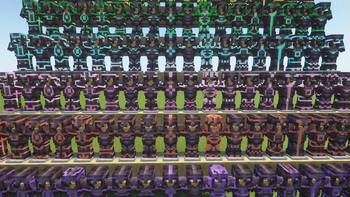
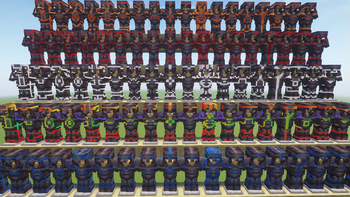
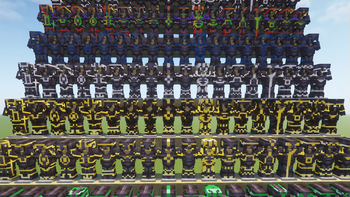
Today, I present to you the Glowing Trim Armors Pack. This texture pack adds glowing trim designs to armors in Minecraft, giving them a unique and stylish look.

It works smoothly with or without shaders, so anyone can enjoy it across supported versions.


===📌Read Carefully===

=OptiFine is required =This pack works by renaming the armors =Includes: -----13+3 colors -----18 trim designs =Applies only to armors =Just rename the armors to activate effects =Supported armor types: Iron, Copper, Gold, Diamond, and Netherite


=== 🎨Armor Colors [13] ===

Color Name Code
Amethyst a
Copper c
Cherry ch
Diamond d
Emerald e
Gold g
Iron i
Lapis l
Netherite n
Quartz q
Redstone r
Resin rs
Prismarine p

=== 🎨Netherite-Only Colors [+3] ===

| Gilded Blackstone | gb | | Magma | m | | Sculk | s |


===🛡️Trim Designs===

Design Code
Bolt 1
Coast 2
Dune 3
Eye 4
Flow 5
Host 6
Raiser 7
Rib 8
Sentry 9
Shaper 10
Silence 11
Snout 12
Spire 13
Tide 14
Vex 15
Ward 16
Wayfinder 17
Wild 18

===⚙️ How to Use===

Rename your armors using a combination of color + design code.

Examples: r14 , a10 , l6 , g7 , c4 , d16 , l2 , n9 , i3 , q12, ch18 , rs17, p15.

Netherite-only examples: m5, gb6, s10


===✨ Changes Applied===

-After applying the pack:

1]Netherite Armor Appearance 2]Diamond Armor Appearance 3]Gold Armor Appearance 4]Iron Armor Appearance 5]Copper Armor Appearance (works from version 1.21.9 and above) 6]GUI


===⚠️ OptiFine Settings Required===

=Make sure these options are enabled: ---Emissive Textures ---Custom Items

=Otherwise, the pack may not work properly. ---Without OptiFine, the glowing (emissive) effect may not work, or the entire pack may fail.


===🔧 Alternative Mods===

=Fabric Mods ---EMF (Entity Model Features) ---ETF (Entity Texture Features) ---Continuity ---CIT Resewn/CIT Resewn Continuation ---Indium

=Forge Mods ---EMF (Entity Model Features) ---ETF (Entity Texture Features) ---Connectedness ---Fusion (Connected Textures) ---CIT Resewn/CIT Resewn Continuation

=NeoForge Mods ---EMF (Entity Model Features) ---ETF (Entity Texture Features) ---Continuity ---CIT Resewn/CIT Resewn Continuation


===❗ Troubleshooting===

-If the pack works the first time but not after reopening Minecraft, reload the texture pack. -If it doesn’t work the first time—even after following the steps—check your OptiFine version. -Make sure OptiFine is installed correctly before using the pack.


===🌍 Compatibility===

-Works in Singleplayer and Multiplayer -Supported versions: 1.16 to latest -Each version has separate files, so check before downloading


===🎉 Final Note===

Enjoy the Glowing Trim Armors Pack!

Thanks for downloading ❤️.

Verified by MCModsHub

These come from our own check of the pack file, not from the source page.

Explore more