
UniversalQuestTracker
Java mod listed for Minecraft 1.21. Downloads from the MC Java Mods app on Android.
This mod allows you to track the progress of FTB quests across multiple modpacks. Works with other quest systems too.
⬇ Download on Modrinth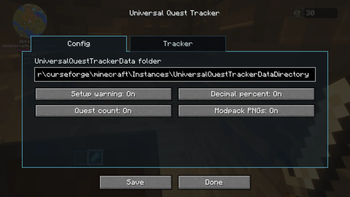
This mod allows you to track your FTB Quest progress and more across multiple modpacks!
Universal Quest Tracker works by writing each modpack’s quest progress into one shared folder on your computer. Once multiple modpacks are pointed at the same folder, the in-game menu can show your progress from all of them in one place.
Setup:
Create a folder anywhere on your computer. You can name it whatever you want, but something like UniversalQuestTrackerData is recommended.
Copy the folder path. On Windows, Shift + Right Click the folder, then choose “Copy as path”.
Load up the modpack.
In game, press U by default to open the Universal Quest Tracker menu. Alternatively you can directly edit the universalquesttracker-common.toml just keep in mind to change the "" in the path to "/" then reload up the modpack.
Paste that folder path into the UniversalQuestTrackerData folder box.
Press Save.
Repeat this for every modpack you want to track, using the same folder path each time.
Once set up, the mod will automatically save quest progress while you play. The tracker menu can show each modpack, world name, and completion percentage. You can also refresh the tracker manually from the menu.
Features:
- Tracks FTB Quests progress across multiple modpacks
- Shared local data folder that works between supported Minecraft versions
- In-game config menu, opened with U by default
- Optional decimal percentages
- Optional completed quest count
- Optional modpack PNG display
- Custom sorting/order for tracked entries
- Generates a readable progress text file alongside its data file
- Important:
This mod is designed for FTB Quests, Better Questing and The Vault Mod (Standalone). All compatable quest mods can also be seen in the "relations" tab of the mod listed as optionally dependent. If no questing system is installed in a modpack, Universal Quest Tracker will note that instead of showing quest progress. The mod will still add the pack to the list, it'll just read null for progress.
This mod is fan-made and is not made by or affiliated with the Feed The Beast team.
Modpack Permission:
You may include Universal Quest Tracker in modpacks, including public modpacks, as long as the mod file is not modified and credit is given. Please link back to this CurseForge page when possible. Do not reupload this mod as a standalone download without permission.
Future plans:
- Port to more versions of the game based on comments I recieve on this mod.
- Add playtime display.
- Add button to hide 100% completed modpacks.
- Add button to hide modpacks without a quest system.
- Incorporate Advancement system... maybe with a toggle.
- Add more customization of what info is displayed.
- Add delete button to tracked modpacks.
- Add whatever you guys suggest in the comments :)
- Edition: Minecraft Java
- File type: .jar
- Minecraft version listed: 1.21.1
- How to install: Install the matching mod loader (Forge, Fabric or NeoForge) for your Minecraft version. → Download the .jar. → Put it in the .minecraft/mods folder and launch that loader profile.
- Where to get it: Opens on Modrinth — not every file is mirrored on our own servers.
Install steps are the general flow for this file type — How to install Minecraft Java mods & modpacks walks through it step by step.
- Ships as UniversalQuestTracker-NeoForge-1.21.1-1.1.1.jar — drop this file into the mods folder
- Download size: 71 KB
- Download link checked 21 Oct 2026 — working
These come from our own check of the pack file, not from the source page.