
IWantToHitFromThreeBlocks
Improve your reaction speed with 3D reach visualization and dynamic crosshairs, and fine-tune your hit distance with the reach indicator
⬇ Download on ModrinthIWantToHitFromThreeBlocks
A client-side utility mod designed for players who want to sharpen their PvP skills. It visualizes your reach distance, confirms whether your hits are registering correctly, and provides detailed combat analysis — all with zero performance impact. Features;
⚠️ Note:
The Reach Overlay and Dynamic Crosshair tolerance features are not recommended for experienced players. These aids may interfere with developing natural game sense and spatial awareness. All other features are safe to use regardless of skill level.
Reach Overlay (2D & 3D):
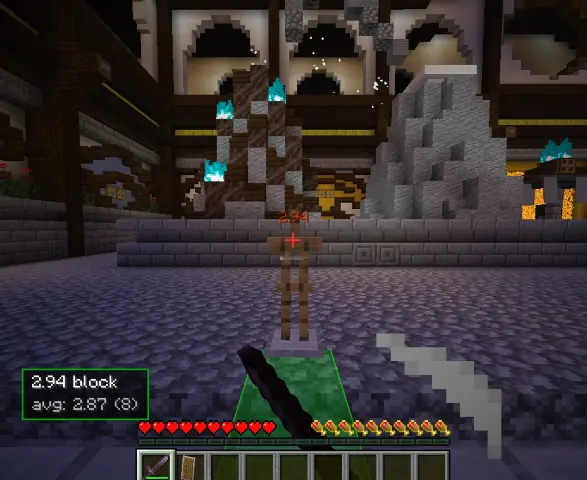
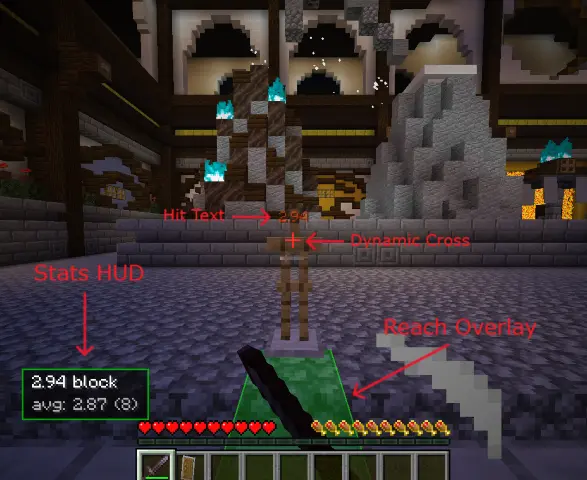
Visualizes your attack range in either 2D or 3D. Toggle between the two views using the Up/Down arrow keys.
Dynamic Crosshair:
The crosshair color automatically changes when you're close enough to land a hit on your target. Unlike similar features in other mods, you can add tolerance based on your own reaction speed.
Stats HUD:
Displays your last hit distance, total hit count, and session average in real time. Features a simple ranking system from D to S-Rank. (These rankings do not reflect your overall PvP skill level — they only indicate your precision in terms of hit distance.) Drag-and-Drop Editor: Reposition and resize any HUD element directly from the settings screen to fit your preferred layout.
Hit Text:
Displays the exact distance of your hit in RGB color directly above your crosshair for a brief moment upon impact.
Combo Sound Effects:
Designed to help you calibrate your hit distance not just visually, but audibly as well. A bell tone plays and rises in pitch with each consecutive hit. If you hit too early or fall below your desired hit distance, the combo breaks — so you'll naturally chase the satisfaction of keeping the sound going, which teaches you proper timing. Because when the combo breaks, it's going to bother you. Local Hit Logging: Your hits are saved to your launcher's .minecraft folder, including the date, time, target entity, and hit distance. Disabled by default. The purpose of this feature is to analyze any increase or decrease in your hit distance over time and provide you with feedback. Configuration Nearly everything — colors, sizes, sound sensitivity — can be customized through ModMenu in the settings screen.
In Game Images
Requirements & Compatibility
- Loader: Fabric
- Dependency: Fabric API
- Supported Versions: Minecraft 1.20 – 1.21.11
- Fully client-side. No server installation required, works on any server
Source
- Edition: Minecraft Java
- File type: .jar
- Minecraft version listed: 1.21.11
- How to install: Install the matching mod loader (Forge, Fabric or NeoForge) for your Minecraft version. → Download the .jar. → Put it in the .minecraft/mods folder and launch that loader profile.
- Where to get it: Opens on Modrinth — not every file is mirrored on our own servers.
Install steps are the general flow for this file type — How to install Minecraft Java mods & modpacks walks through it step by step.
- Ships as IWantToHitFromThreeBlocks-v1.0.0-1.21.11.jar — drop this file into the mods folder
- Download size: 91 KB
- Download link checked 7 Sept 2026 — working
These come from our own check of the pack file, not from the source page.