
QuestBridge
Java mod listed for Minecraft 26.x. Downloads from the MC Java Mods app on Android.
⬇ Download on Modrinth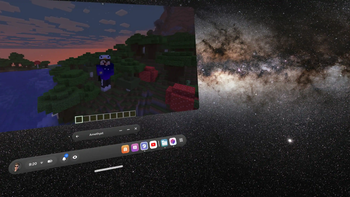
QuestBridge



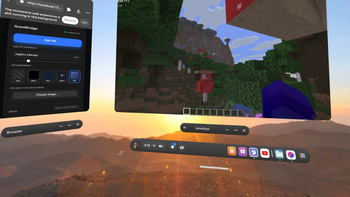
QuestBridge is a Minecraft client-side Fabric mod that bridges Meta Quest 3 controllers directly to Minecraft Java Edition running natively on the headset. It hosts a local WebXR webpage that captures controller inputs and sends them to the running game instance via a low-latency WebSocket server, enabling a console-like immersive experience entirely standalone without a PC.
📖 Looking for the Full Installation Guide?
For the complete step-by-step setup, custom Amethyst controller layouts (to play ESC/T in-game), and advanced troubleshooting, please read our Full Installation Guide on GitHub!
Demo video:
Seu navegador não suporta a exibição de vídeos HTML5.
Features
- Standalone VR Support
- Immersive Environments
- Integrated Controller Haptics ⭐
- Persistent Settings
Requirements
Ensure all of the following requirements are met before starting:
- Meta Quest 3 (Tested) | Quest 3S & 2 (Supported).
- Developer Mode Enabled on the headset. Refer to the Official Meta Developer Guide for setup steps.
- "Seamless Multitasking" enabled on the headset
- Amethyst-Android launcher installed.
- Controlify and Fabric API installed in your mods folder.
How to use
- Launch Minecraft: Open Amethyst and boot the game using your configured Fabric profile.
- Launch Quest Browser: Open the native Meta Quest Browser and navigate to:
Troubleshooting
| Issue | Potential Cause | Resolution |
|---|---|---|
| Inputs not registering | Seamless Multitasking is disabled | Ensure Seamless Multitasking is turned ON in the Quest Experimental settings. |
| Controllers disconnected | Focus shift | Confirm that you are not pointing the controllers directly at the Minecraft panel. |
| Page not loading | Server port conflict or mod not running | Verify Minecraft has fully loaded Amethyst and ensure the browser is pointed to http://localhost:7373. |
| Passthrough mode is black | Permission block or session type issue | Ensure you selected the Pass card before pressing Enter VR so that the system correctly initializes an immersive-ar session. |
| Haptics missing | Intensity set to 0% | Adjust the Haptic Intensity slider to a value greater than 0% on the Web UI. |
License
This project is licensed under the MIT License - see the LICENSE file for details.
- Edition: Minecraft Java
- File type: .jar
- Minecraft version listed: 26.1.2
- How to install: Install the matching mod loader (Forge, Fabric or NeoForge) for your Minecraft version. → Download the .jar. → Put it in the .minecraft/mods folder and launch that loader profile.
- Where to get it: Opens on Modrinth — not every file is mirrored on our own servers.
Install steps are the general flow for this file type — How to install Minecraft Java mods & modpacks walks through it step by step.
- Ships as questbridge-1.0.1.jar — drop this file into the mods folder
- Download size: 1.2 MB
- Download link checked 22 Oct 2026 — working
These come from our own check of the pack file, not from the source page.