Cobblemon Environment Interactions
Turn your Cobblemon partners into useful field companions!
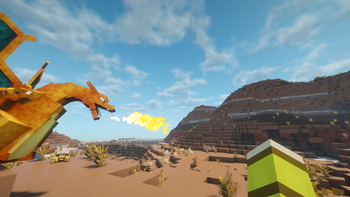
Cobblemon Environment Interactions adds Pokemon-powered mining and utility interactions while riding a Cobblemon Pokemon or commanding one nearby companion Pokemon.
NOTE: if using pasture blocks, the mod may detect pasture pokemon as companions and therefore ask for only a single pokemon to be out.
NOTE: only works with actual Cobblemon Pokemon, not vanilla mobs or other mods' Pokemon.
Requirements
- Minecraft
1.21.1 - Java
21 - Fabric Loader
0.18.4+and Fabric API0.116.11+1.21.1, or NeoForge21.1.229+ - Cobblemon
1.7.3+1.21.1
Optional, but recommended:
- Mod Menu
11.0.3on Fabric - Cloth Config API
15.0.140
For multiplayer, install the mod on both the server and every client.
Installation
- Install Fabric Loader for Minecraft
1.21.1. - Install Fabric API and Cobblemon.
- Put the Cobblemon Environment Interactions jar in your
modsfolder. - Start the game.
- Join a world and press
Vto enable Pokemon interactions.
Pokemon interactions are disabled by default each time you join a world, so normal clicking is safe until you turn them on.
Controls
| Action | Input |
|---|---|
| Enable or disable Pokemon interactions | V |
| Mine with a mounted Pokemon | Ride a Pokemon and left-click |
| Use a mounted Pokemon's type utility | Ride a Pokemon and right-click |
| Mine with a companion Pokemon | Sneak-left-click with exactly one owned Pokemon nearby |
| Use a companion Pokemon's type utility | Sneak-right-click with exactly one owned Pokemon nearby |
Companion commands only work when exactly one owned Pokemon is nearby.
How It Works
Left-click mining breaks blocks using the Pokemon you are riding or commanding. The stronger offensive stat, Attack or Special Attack, controls mining power. Speed lowers the mining cooldown.
Right-click utilities use the Pokemon's type. Some utilities work on the aimed block, while others work on dropped items near the target. Higher stats mean larger areas, more processed items, better rolls, or stronger special outputs.
Held items matter. A Pokemon holding the matching type item gets a +50 power boost for mining and utilities. Dual-type Pokemon can also use a matching held item to choose which of their types to use.
Default Tiering And Behavior
Default mining tiers:
| Pokemon mining power | Impact radius | Range |
|---|---|---|
Below 50 |
0 | 8 blocks |
50-149 |
1 | 11 blocks |
150+ |
2 | 15 blocks |
Default utility tiers for most right-click utilities:
| Pokemon utility power | Dropped item limit | Block area radius |
|---|---|---|
Below 50 |
8 | 0 |
50-149 |
16 | 1 |
150-299 |
32 | 2 |
300+ |
64 | 3 |
Steel prospecting uses a fixed 3x3 footprint and scales depth instead of radius:
| Steel utility power | Prospecting area |
|---|---|
Below 50 |
3x3x1 |
50-149 |
3x3x2 |
150-299 |
3x3x3 |
300+ |
3x3x4 |
Default utility cooldowns:
| Speed | Cooldown |
|---|---|
Below 50 |
10 seconds |
50-149 |
5 seconds |
150-299 |
2 seconds |
300+ |
0 seconds |
Some powerful actions, such as rare crafting, hive harvesting, camp cooking, and large repairs, use a longer cooldown.
Right-Click Utilities
Normal
Held item: Silk Scarf
- Aim at a lit campfire to create food.
- Better stats unlock better food rolls.
Fire
Held item: Charcoal
- Smelt dropped items.
- Fill empty buckets with lava.
- Light campfires, candles, TNT, and fire positions.
- Fill tiny holes with lava.
- Melt snow and ice.
- Directly evaporate targeted water.
Water
Held item: Mystic Water
- Fill empty buckets and glass bottles.
- Turn concrete powder into concrete.
- Make mud from dirt.
- Place water in tiny holes.
- Extinguish fire and cool targeted lava.
- Fill cauldrons and hydrate farmland.
Grass
Held item: Miracle Seed
- Harvest, grow, and replant crops.
- Turn dirt into grass.
- Turn mud into rooted dirt.
- Grow saplings with moss-themed growth.
- Place vines.
- Make mossy stone variants.
Electric
Held item: Magnet
- Turn sand into redstone.
- Turn torches into redstone torches.
- Toggle copper bulbs on or off.
- Reduce copper oxidation in an area.
- Call lightning on lightning rods.
Ice
Held item: Never-Melt Ice
- Directly freeze targeted water.
- Place snow.
- Fill tiny holes with powder snow.
- Turn water buckets into powder snow buckets.
- Compress snow and ice into packed ice or blue ice.
Fighting
Held item: Black Belt
- Repair dropped gear.
- Smash wood into planks.
- Smash stone into rougher variants.
- Apply stonecutter-style transforms to dropped blocks.
Poison
Held item: Poison Barb
- Brew negative potions.
- Turn arrows into tipped arrows.
- Rot food.
- Create poisonous potatoes and spider eyes.
- Spread mycelium.
- Grow mushrooms or nether wart on mycelium.
- Turn moss into slime balls.
Ground
Held item: Soft Sand
- Till dirt and grass into farmland.
- Fill tiny holes with gravel.
- Turn sand into sandstone.
- Turn red sand into red sandstone.
- Turn mud into packed mud.
Flying
Held item: Sharp Beak
- Shake leaves for sticks, saplings, apples, and cocoa beans.
- Harvest berries and cocoa.
- Clear grass, flowers, vines, cobwebs, snow, and similar light blocks.
- Stir up wild Bug-type encounters.
Psychic
Held item: Twisted Spoon
- Pull nearby dropped items to the player.
- Blink the player to a safe targeted landing spot.
- Blink the mounted Pokemon with the player when mounted.
Bug
Held item: Silver Powder
- Harvest beehives.
- Turn leaves into cobwebs.
- Place cobwebs.
- Turn dropped leaves into cobwebs.
- Compost eligible dropped items into bone meal.
Rock
Held item: Hard Stone
- Carve a tunnel in the direction you are looking.
- Higher stats increase tunnel size and depth.
- Ore blocks are preserved when ore preservation is enabled.
Ghost
Held item: Spell Tag
- Turn grass blocks into sculk.
- Spawn one pumpkin above haunted sculk.
- Turn pumpkins into jack-o-lanterns.
- Turn dropped grass blocks into sculk.
- Condense
9amethyst shards into1echo shard.
Dragon
Held item: Dragon Fang
- Turn glass bottles into dragon's breath.
- Turn obsidian into crying obsidian.
- Turn cobbled stones into end stone.
- Turn leaves into chorus fruit or flowers.
- Turn glass into ender pearls.
- Turn scutes or draconic materials into shulker shells.
Dark
Held item: Black Glasses
- Turn torches, lanterns, campfires, and fire into soul variants.
- Turn glass into tinted glass.
- Turn sand into soul sand.
- Turn dirt and grass into soul soil.
- Turn stone into blackstone.
Steel
Held item: Metal Coat
- Repair damaged anvils.
- Prospect breakable blocks for bonus ore materials.
- Use
3x3x1,3x3x2,3x3x3, or3x3x4prospecting areas based on Steel utility power. - Preserve ore blocks when ore preservation is enabled.
Fairy
Held item: Fairy Feather
- Enchant dropped items.
- Grow flowers on grass.
- Brew positive potions.
- Craft enchanted golden apples from apples with gold ingots or from regular golden apples.
- Make
1/2/3/4enchanted golden apples by utility tier.
Safety
The mod is designed to be useful without surprising you.
- Interactions stay off until you press
V. - Companion commands require exactly one owned Pokemon nearby.
- Mining, Rock tunnels, and Steel prospecting use block-breaking safety rules.
- Many block utilities are surface-aware, so they do not change hidden blocks through a solid cover layer.
- Protection mods can stop mining through Fabric block-break events.
Right-click utilities can still intentionally change blocks or consume dropped items, so treat V like a tool mode.
The code release is coming soon.
- Edition: Minecraft Java
- File type: .jar
- Minecraft version listed: 1.21.1
- How to install: Install the matching mod loader (Forge, Fabric or NeoForge) for your Minecraft version. → Download the .jar. → Put it in the .minecraft/mods folder and launch that loader profile.
- Where to get it: Opens on Modrinth — not every file is mirrored on our own servers.
Install steps are the general flow for this file type — How to install Minecraft Java mods & modpacks walks through it step by step.
- Ships as cobblemon-environment-interactions-neoforge-3.1.0-neoforge.jar — drop this file into the mods folder
- Download size: 249 KB
- Download link checked 28 Aug 2026 — working
These come from our own check of the pack file, not from the source page.