
CraneMod-ZombieZ
Java mod listed for Minecraft 26.x. Downloads from the MC Java Mods app on Android.
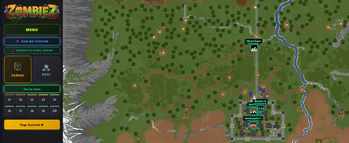
Minimap, interactive map with all skull zones, bosses, and real-time player positions — for the ZombieZ server on Rinaorc.
I don't know my version or loader
CraneMod ZombieZ
CraneMod ZombieZ is a client-side Fabric 1.21.4 mod that enhances your experience on the ZombieZ server (Rinaorc). An interactive map, a minimap, and the real-time position of other players using the mod.
✨ Main features
🎮 How to use
Press M (rebindable in key options) to open the menu:
- Maps → opens the full HTML map in your browser
- Information → mod info & updates
- Complete guide / Video guide / Official wiki → links to community resources
🗺️ Interactive HTML map
- The 50 skull zones displayed with their exact positions (X, Y, Z)
- All bosses with their respawn zones
- Real-time position of your character on the map
- Other players' positions (those using the mod) with their skin head and HP
- Waypoints: visible in-game to help you find each skull
📍 In-game minimap
- Pixel-art minimap directly in the HUD
- Movable and resizable via the menu (M key)
- Shows skulls, bosses and other players around you
- Player head, directional arrow, and chunks rendered in real time
🎯 Quality of life
- Right-click on a skull → it disappears from the minimap (handy to track those already collected)
- Active waypoints HUD with distance and directional arrow
- Promo banner displayed automatically in certain NPC GUIs
rinaorc.comautomatically added to the top of your server list on first launch
🔒 Privacy info
The mod sends your position (X, Y, Z, dimension, HP, mod version) to an HTTP relay only when you're playing on Rinaorc.com, so other mod users can see you on the map.
You can disable position sharing at any time in config/maps-cranes-zombiez.json by setting sharePositionOnRinaorc: false. You'll then be invisible to others and won't see them either.
No data is shared outside the Rinaorc server.
💬 Support / Bugs / Suggestions

Join the Discord to report a bug, suggest improvements, or stay updated on releases:
- Edition: Minecraft Java
- File type: .jar
- Minecraft versions listed: 26.1, 26.1.1, 26.1.2
- How to install: Install the matching mod loader (Forge, Fabric or NeoForge) for your Minecraft version. → Download the .jar. → Put it in the .minecraft/mods folder and launch that loader profile.
- Where to get it: Opens on Modrinth — not every file is mirrored on our own servers.
Install steps are the general flow for this file type — How to install Minecraft Java mods & modpacks walks through it step by step.
- Ships as CraneMod-ZombieZ-26.1-1.1.4.jar — drop this file into the mods folder
- Download size: 10.0 MB
- Download link checked 17 Oct 2026 — working
These come from our own check of the pack file, not from the source page.