
Tinkers Compass
Java mod listed for Minecraft 26.x. Downloads from the MC Java Mods app on Android.
⬇ Download on Modrinth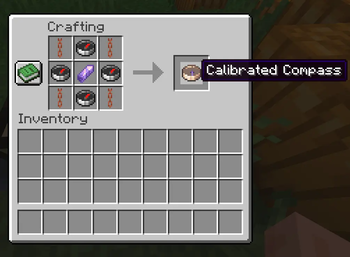
Tinkers Compass
Vanilla+ Waypoints
Minecraft has always had a compass.
It can point home.
It can find a Lodestone.
And then... that's about it.
Meanwhile, most waypoint mods solve navigation by covering your screen with markers, minimaps and floating labels. Tinkers Compass takes a different path.
A new WAY to create WAYpoints!
Instead of adding another overlay, it expands Minecraft's own navigation system into something richer, smarter, and naturally integrated into survival gameplay.
No minimaps.
No GPS.
No breaking immersion.
Tinkers Compass expands Minecraft's navigation system with a new compass type that supports multiple lodestones, slot naming, and dimension‑aware mechanics.
Designed Around Vanilla
Every feature is built around mechanics that already exist in Minecraft.
Smithing upgrades.
Cartography.
Anvils.
Grindstones.
Explorer Maps.
Lodestones.
Rather than replacing vanilla progression, Tinkers Compass extends it, making exploration feel like a natural evolution instead of a completely new system.
The result is a navigation experience that feels surprisingly familiar as if it had always belonged in the game.
Meet the Calibrated Compass
The Calibrated Compass is the heart of the mod.
Instead of remembering only a single destination, it stores multiple locations inside one item.
It starts with 4 memory slots, and can be expanded up to 6 through survival progression.
Need to switch destinations?
Simply hold the compass and press Shift + Right Click to cycle between saved locations.
Each slot behaves independently, allowing you to organize your adventures however you like.
- 🏠 Home Base
- ⛏️ Mega Mine
- 🌲 Woodland Mansion
- 🧪 Trial Chamber
- 🐉 Stronghold
- 🏰 Ancient City
No menu hunting.
No giant maps.
Just your compass and you.
waxed copper chain | compass | waxed copper chain
compass | amethyst shard | compass
waxed copper chain | compass | waxed copper chain\
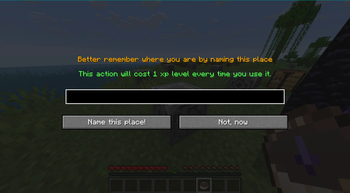
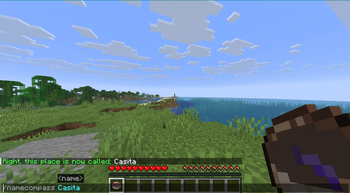
Rename slots via a custom GUI.
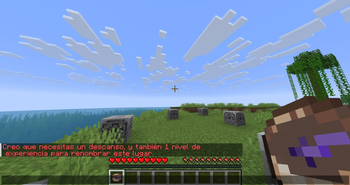
Costs 1 XP level per rename.
Default names: “Calibrated Compass: Lodestone N”.
If no lodestone is assigned, it shows simply “Calibrated Compass”.
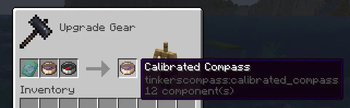
Increase its memory using the Compass Memory Upgrade Smithing Template, discovered during exploration.
Every additional slot is earned—not given.
Use the smithing table.
Recipe: paper + calibrated compass + copper ingot → +1 memory slot.
Currently limited to 6 slots maximum (the original 4 + 2 upgrades).
/namecompass available if GUI fails.
Also consumes 1 XP level.
Waypoints That Feel Like Minecraft
Unlike traditional waypoint mods, locations are obtained through gameplay.
Discover Explorer Compasses
Cartographers know more than they tell.
Combine a Compass with an Explorer Map (or a Buried Treasure Map) inside the Cartography Table to create an Explorer Compass.
These mysterious compasses preserve the destination without revealing it immediately.
Later, you can extract that hidden location into your Calibrated Compass using an Anvil.
A treasure map becomes a permanent memory.
Vanilla Lodestones still matter
Regular Lodestone Compasses integrate seamlessly.
Transfer their destination directly into your Calibrated Compass while preserving custom names.
Nothing becomes obsolete.
Everything works together.
Built for survival
Exploration should reward planning—not punish mistakes.
That's why the mod includes several safeguards behind the scenes.
- Prevents duplicate saved locations.
- Prevents invalid dimension transfers.
- Protects upgrade materials when operations fail.
- Blocks exceeding the maximum slot capacity.
- Provides clear in-game feedback instead of silently failing.
The goal isn't to add restrictions.
It's to make every saved destination feel meaningful.
Helpful Without Getting In The Way
The interface stays lightweight while still providing the information you need.
Custom tooltips display:
Active slot Slot names Empty memories Broken Lodestones Stored dimensions
Smithing upgrades also include contextual icons and visual hints to make progression intuitive without requiring a wiki.
Under The Hood
Although Tinkers Compass feels like a vanilla feature, a lot happens behind the scenes.
The mod extends Minecraft through carefully designed Mixins that integrate directly with existing mechanics, including:
- Cartography Tables
- Anvils
- Grindstones
Instead of replacing vanilla systems, it teaches them a few new tricks.
This keeps compatibility high while preserving the familiar Minecraft experience.
Current Features
- 🧭 Calibrated Compass with expandable memory
- 📍 Up to 6 independent waypoint slots
- 🔄 Quick slot switching (Shift + Right Click)
- ⚒️ Smithing-based progression
- 🗺️ Explorer Compass crafting
- 🧱 Lodestone integration
- 🔨 Anvil extraction system
- 🪨 Grindstone slot wiping
- 💬 Custom tooltips and UI hints
- 🛡️ Intelligent validation and safety systems
- 🌍 Multi-language support
Supported Languages:
- en_Us
- es_Ec (localizad)
- es_Es
- es_Mx
- fr_FR\
Road Ahead
Tinkers Compass is still in active development.
Future updates are planned to further expand exploration while staying faithful to vanilla design.
Some ideas currently on the workbench include:
- New compass variants
- More discoverable navigation mechanics
- Additional progression paths
- Better visual customization
- Even deeper integration with Minecraft's exploration systems
Feel free to include this mod in your modpacks!
📜 Version History & Archive
🔍 v0.0.4 Changes (Current Release)- RWorkstation Expansion: Fully integrated Anvil data extraction, Grindstone slot clearing, and Cartography Table recipes into the core gameplay loop.
- Explorer Compass Loop: Introduced a new exploration mechanics loop using a broken-needle compass container to extract map coordinate data.
- Mixin Architecture: Shifted backend logic to a robust Mixin-based injection system to maximize compatibility and prevent vanilla code conflicts.
- Enhanced Validation Safeguards: Expanded internal checks to actively block duplicate entries, cross-dimension bleeding, and slot overflow directly inside the workstation UI.
- Recipe Balancing: The grid layout now strictly requires Waxed Copper Chains (
minecraft:waxed_copper_chain) instead of normal copper chains to perfectly match the internal Java data validation channels. - Security Update: Integrated smart anti-cheat grid scan that prevents duplicate lodestone links and mixing different dimensions.
- Inventory Shield: Forced
.stacksTo(1)to permanently resolve metadata sharing bugs in grouped items.
- Upgrade System Overhaul: The upgrade method moved from the vanilla crafting table to the Smithing Table.
- New Items: Introduced the custom Memory Upgrade Smithing Template to guide the modular progression up to 6 slots, discarding the legacy raw materials recipe.
- Visual Enhancements: Added custom empty slots textures and icons mapping directly to the smithing UI catalog.
- Initial Release: The Calibrated Compass was introduced with a baseline capacity of 4 dynamic memory slots.
- Legacy Upgrade Method: Upgrades from 4 to 6 slots were crafted directly in the standard Crafting Table using paper and a copper ingot.
- Basic Textures: Standard textures for linked and empty slot selection.
- Edition: Minecraft Java
- File type: .jar
- Minecraft version listed: 26.2
- How to install: Install the matching mod loader (Forge, Fabric or NeoForge) for your Minecraft version. → Download the .jar. → Put it in the .minecraft/mods folder and launch that loader profile.
- Where to get it: Opens on Modrinth — not every file is mirrored on our own servers.
Install steps are the general flow for this file type — How to install Minecraft Java mods & modpacks walks through it step by step.
- Ships as tinkerscompass-0.1.1+26.2.jar — drop this file into the mods folder
- Download size: 192 KB
- Download link checked 21 Oct 2026 — working
These come from our own check of the pack file, not from the source page.