
Tyr's Fluid Void Stuff
A simple mod that changes how the edge of fluids renders in the void. Also can control how far said fluids fall.
⬇ Download on Modrinth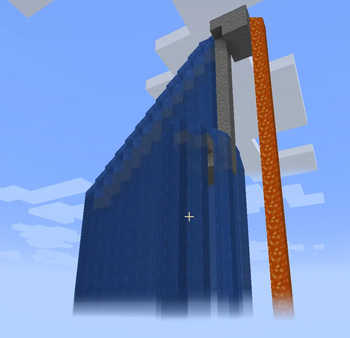
Tyr's Fluid Void Stuff
This mod is all about two things:
- Fade out fluids that do not end on a block so that they look pretty in void environments (Clientside, does not require mod on server)
- Limit how far a liquid can fall from its source block to prevent huge waterfalls (Serverside, does not require mod on client)
The client renderer is ported from FluidVoidFading (Neoforge 1.21.8) by DaFuqs under the GNU General Public License.
What it does
On the client, the bottom of any fluid column fades out smoothly rather than ending with a hard edge. Works on water, lava, and modded fluids. Sodium is supported.
On the server, you can set a maximum vertical drop for fluid columns. Once a column hits the limit, it stops spreading downward and leaves air below. The limit is measured as straight vertical distance from the source, so it works the same whether the fluid falls straight down or zig-zags down i.e. a staircase. Individual fluids can be exempted from this via a blacklist.
Neither side requires the other. See below.
The mod is optional on both ends of a connection (Server or Client)
| Setup | What happens |
|---|---|
| Client + Server | Full functionality with the fade renderer on the client and the column cap on the server. |
| Client only | Fade renderer works for columns that end in air naturally (e.g. in the void). No other functionality. |
| Server only | Vertical fluid limits only. Players without the mod just see normal fluid rendering, the liquid still stops, it just won't show the fade-out thingamabob. |
Config
Config file: config/tyrsfluidvoidstuff-server.toml.
| Option | Default | What it does |
|---|---|---|
maxFluidColumnLength |
0 |
Max vertical drop in blocks from the source. 0 = disabled. |
fluidColumnLengthBlacklist |
(empty) | Fluid IDs to skip the cap for, e.g. minecraft:water. |
If you have the mod on the client, the config is also reachable from the Mods screen in-game.
Credits
- Edition: Minecraft Java
- File type: .jar
- Minecraft version listed: 1.21.1
- How to install: Install the matching mod loader (Forge, Fabric or NeoForge) for your Minecraft version. → Download the .jar. → Put it in the .minecraft/mods folder and launch that loader profile.
- Where to get it: Opens on Modrinth — not every file is mirrored on our own servers.
Install steps are the general flow for this file type — How to install Minecraft Java mods & modpacks walks through it step by step.
- Ships as tyrsfluidvoidstuff-1.0.1.jar — drop this file into the mods folder
- Download size: 23 KB
- Download link checked 20 Aug 2026 — working
These come from our own check of the pack file, not from the source page.