
Vanilla PVP presets
You can switch between Vanilla and Non-Vanilla modes. DrDonut uses this during his streams. This could be used for when you would want to be in vanilla…
⬇ Download on Modrinth
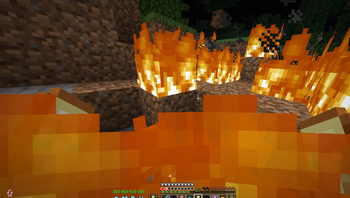
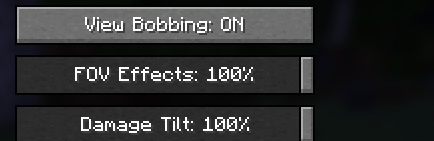
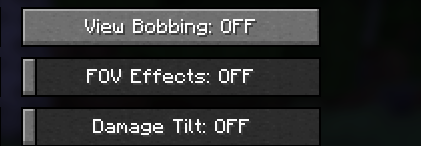
Vanilla PVP Presets
Vanilla PVP Presets is a lightweight Minecraft mod that enables players to switch between Vanilla Mode and Non-Vanilla Mode with a keybind.
This mod is useful for players looking to switch between the Vanilla mode visuals and the optimized settings for PvP mode gameplay.
The default keybind for this mod is F9 and can be changed via the Minecraft controls menu.
Vanilla Mode
Explosion particles
Normal fire height
View bobbing
Damage tilt
FOV effects
Non-Vanilla Mode
Explosion particles disabled
Low fire is enabled
View bobbing disabled
Damage tilt disabled
FOV effects disabled
why use ths mod
This mod enables players to quickly switch between vanilla mode and non vanilla mode to play with the visuals they want
- Edition: Minecraft Java
- File type: .jar
- Minecraft version listed: 1.21.11
- How to install: Install the matching mod loader (Forge, Fabric or NeoForge) for your Minecraft version. → Download the .jar. → Put it in the .minecraft/mods folder and launch that loader profile.
- Where to get it: Opens on Modrinth — not every file is mirrored on our own servers.
Install steps are the general flow for this file type — How to install Minecraft Java mods & modpacks walks through it step by step.
- Ships as vanilla-toggle-client-1.0.0.jar — drop this file into the mods folder
- Download size: 8 KB
- Download link checked 6 Sept 2026 — working
These come from our own check of the pack file, not from the source page.