
PeanutsChat
Java mod listed for Minecraft 26.x. Downloads from the MC Java Mods app on Android.
⬇ Download on Modrinth
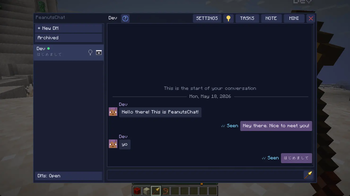
Direct messaging someone has never been easier. Now that PeanutsChat is here, you don't have to share a small chat window with everyone else on the server anymore! You know what I'm talking about 😈
Never lose your chats in game again!
Features
1:1 DMs and Group DMs
Full screen layout
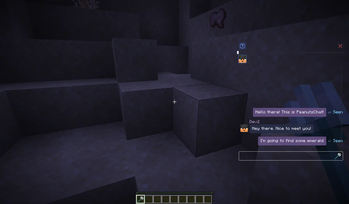
Mini docked layout, you can keep doing whatever you're doing while the chat is open! Press a key to focus on the chat and type. Switch between chats easily *Layouts are saved for the next time you join the server again
You can drag the mini layout anywhere on the screen!
Click outside of mini chat or press Esc to defocus! Press a hotkey to focus on chat again!
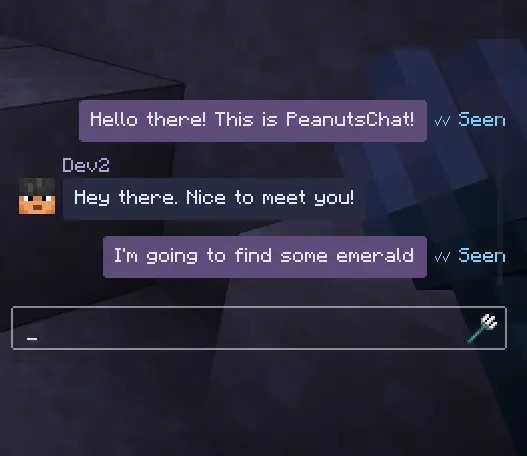
Reply to someone in chat
Bookmark messages
Read receipts
Unsend messages within 5 minutes
Mention @name
Share your coordinates
Share held item, good for checking interest before trading!
Push notifications as Toast so you know if someone messaged you even without having chat open
Highlight text in message input and cut copy paste.
Right click context menu to copy text in message bubble.
Pin, archive messages
Unread message count
/whisper someone in chat and it will be viewable in the DM UI
To-do list - You can write whatever you want
Rebindable hotkeys!
IME Support, type in Chinese, Japanese, Korean, whatever you want
OP Tools
/peanutschats commands for OPs
Report a user and it will be sent to server operators
Audit log
Security & Privacy
- End-to-end encryption - Your chats will never be seen by anyone else, even the admins of the server you're playing on.
- Your message history is saved locally on your own PC, not server-side.
AND MORE!
How to use
| Key | Action |
|---|---|
\\ (backslash) |
Open / close chat panel |
] (right bracket) |
Toggle full ↔ mini overlay |
| Esc (in mini mode) | Blur input — resume mining/moving |
| Enter | Send message |
| Ctrl+C / V / X / A | Standard clipboard + select all |
| Right-click bubble | Copy / Reply / Bookmark / Report / Unsend menu |
Requirements
Install on both the server and every client.
Should work with mods like Essential.
Feedback
Let me know via Discord if you have any feedback!
If you really like the mod and would like to donate, it would be greatly appreciated!
I prefer making mods that actually bring something new to the table rather than reskins of existing content in game, if that's up your alley, any donation would motivate me greatly to make more innovative mods/improve my released mods! If you aren't comfortable donating/can't afford to do so(which is completely fine), sharing and letting others know of the mods will help greatly as well! Cheers!
- Edition: Minecraft Java
- File type: .jar
- Minecraft version listed: 26.1.2
- How to install: Install the matching mod loader (Forge, Fabric or NeoForge) for your Minecraft version. → Download the .jar. → Put it in the .minecraft/mods folder and launch that loader profile.
- Where to get it: Opens on Modrinth — not every file is mirrored on our own servers.
Install steps are the general flow for this file type — How to install Minecraft Java mods & modpacks walks through it step by step.
- Ships as Peanutschat-0.2.5.jar — drop this file into the mods folder
- Download size: 257 KB
- Download link checked 23 Oct 2026 — working
These come from our own check of the pack file, not from the source page.