StereoCraft: Stereoscopic 3D
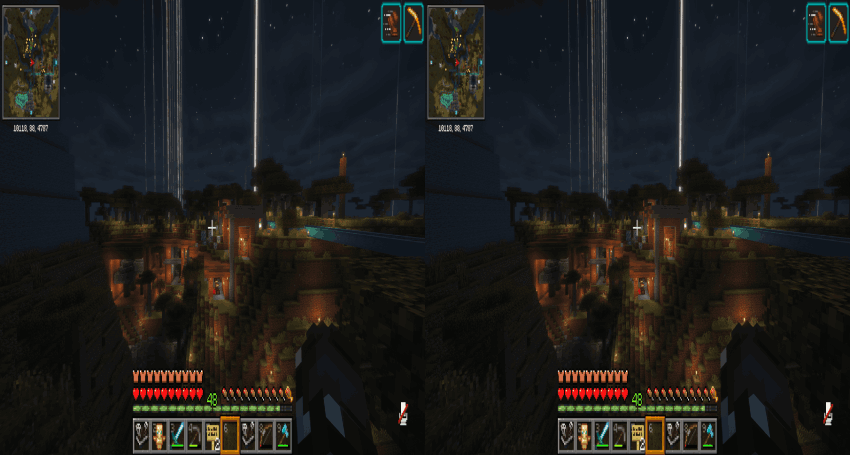
Side-by-side (SBS) stereoscopic 3D rendering for 3D TVs, 3D monitors, and SBS-compatible displays. StereoCraft splits the Minecraft window into left and…
⬇ Download on ModrinthStereoCraft: Stereoscopic 3D
Side-by-side (SBS) stereoscopic 3D rendering for 3D TVs, 3D monitors, VR headsets, and any SBS-compatible display. StereoCraft splits the Minecraft window into left- and right-eye views with a configurable interpupillary distance (IPD) and convergence, producing a true stereoscopic image you can feed into any SBS display or HMD virtual-monitor passthrough.
StereoCraft ships for four Minecraft platforms from a single codebase — Fabric (26.1.2 and 1.21.11), NeoForge (1.21.1), and Angelica/GTNH (1.7.10) — with the same core feature set on each.
Supported versions
| Platform | Minecraft | Loader / API | Java | Required renderer |
|---|---|---|---|---|
| Fabric | 26.1.2 | Fabric Loader 0.19.3+ | 25 | Sodium mc26.1.2-0.8.12 |
| Fabric | 1.21.11 | Fabric Loader 0.19.2+ | 21 | Sodium mc1.21.11-0.8.11 |
| NeoForge | 1.21.1 | NeoForge 21.1.228+ | 21 | Sodium 0.6.13 (NeoForge) |
| Angelica / GTNH | 1.7.10 | Forge 10.13.4.1614 | GTNH runtime (Java 17–25 via lwjgl3ify) | Angelica 2.1.x + GTNHLib |
Grab the jar matching your Minecraft version and loader from the Releases page.
Features
- SBS-Half stereoscopic mode — splits the framebuffer left/right at half horizontal resolution per eye.
- Adjustable stereo strength (IPD) — 55–100 mm. 64 mm matches average human IPD; higher values give exaggerated "hyperstereo" depth.
- Convergence distance — sets the zero-parallax plane (what sits at the screen); nearer objects pop out, farther ones recede.
- Swap eyes — for SBS displays / passthrough setups with reversed eye assignment.
- Shader support via Iris (optional) — per-eye-correct deferred pipeline, shadows, reflections, and DH terrain.
Requirements
Every platform requires the Sodium-family renderer listed above as a hard dependency — on 1.7.10 this is provided by Angelica. Install the version matching your Minecraft/loader.
Optional
- Iris — shader-pack support. Each build is tested against one specific Iris version:
- Fabric 26.1.2 →
1.10.9+26.1-fabric - Fabric 1.21.11 →
1.10.7+1.21.11-fabric - NeoForge 1.21.1 →
1.8.12 - 1.7.10 → provided by Angelica
- Fabric 26.1.2 →
- Voxy (Fabric only) — per-eye LOD rendering (
0.2.16-betaon 26.1.2,0.2.15-betaon 1.21.11). Not available on NeoForge or 1.7.10.
Installation
- Install the loader for your Minecraft version (Fabric / NeoForge / Forge+Angelica per the table).
- Install the required renderer (Sodium — or Angelica on 1.7.10) into
mods/. - (Optional) Install the matching Iris version for shaders, and/or Voxy on Fabric.
- Download the StereoCraft jar for your platform from Releases and drop it into
mods/. - Launch the game.
Configuration
Open Video Settings → Stereoscopic (added to Sodium's options page).
- Toggle the stereo Mode on/off here. Changing the mode triggers a renderer reload, so the screen may flash briefly (Sodium shows a small reload icon beside the option to indicate this).
- IPD, convergence, and swap eyes live on the same page.
Config file location:
- Fabric & NeoForge:
config/stereoscopic-options.json - 1.7.10 (Angelica):
config/stereoscopic.cfg
Manual edits round-trip cleanly, but values changed in the in-game options page overwrite the file on save.
Known limitations
- Cursor in split-screen GUIs: the async-cursor feature that mirrors the OS cursor into both eyes is Windows-only. On Linux/macOS the cursor appears in only one eye while a screen (inventory, chat, menu) is open.
- Iris compatibility: each build is tested against one specific Iris version (above). Other versions may load but can silently degrade per-eye rendering — if you hit issues, file a report with your exact Iris version.
- Voxy: per-eye LOD is Fabric-only; the NeoForge Voxy port ships without its Iris integration, so it is disabled there.
Screenshot
License
StereoCraft is licensed under LGPL-3.0-only.
- Edition: Minecraft Java
- File type: .jar
- Minecraft version listed: 1.21.11
- How to install: Install the matching mod loader (Forge, Fabric or NeoForge) for your Minecraft version. → Download the .jar. → Put it in the .minecraft/mods folder and launch that loader profile.
- Where to get it: Opens on Modrinth — not every file is mirrored on our own servers.
Install steps are the general flow for this file type — How to install Minecraft Java mods & modpacks walks through it step by step.
- Ships as stereoscopic-fabric-1.21.11-0.2.0.jar — drop this file into the mods folder
- Download size: 101 KB
- Download link checked 8 Sept 2026 — working
These come from our own check of the pack file, not from the source page.