
[ENG] A simple navigation mod, including dimension navigation — provided you have saved portals.
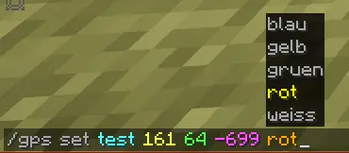
/gps set "name" "x" "y" "z" "Color [Optional]"
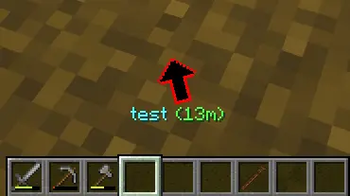
You can start navigation to the specified coordinates .
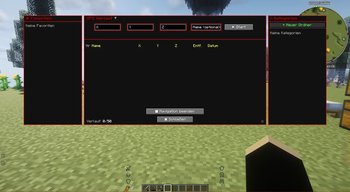
These coordinates are then saved in the "History," including the dimension. From there, you can, of course, start navigation again, share them, add them to your favorites, or add them to a route (if you wish to create a multi-point route). 50 entries are saved after that, the oldest ones are automatically deleted.
To open the history: press "G" (this can be changed in the options) or /gps history.
You can also start navigation in the History window.
You can create categories on the right side, in which GPS destinations can also be saved by right-clicking within the history window.
/gps share
You can share your current navigation in the chat using /gps share or in the GPS GUI by clicking the arrow "[↗]". Any player can then click on the message to start the navigation as well.
/gps end
Ends the current navigation.
[GER] Eine einfache Navigationsmodifikation mit Dimensionsnavigation – vorausgesetzt, du hast Portale gespeichert.
/gps set "Name" "x" "y" "z" "Farbe [Optional]"
Startet eine Navigation zu den angegebenen Koordinaten.
Diese Koordinaten werden dann zusammen mit der Dimension im Verlauf gespeichert. Von dort aus kannst du die Navigation natürlich erneut starten, die Koordinaten teilen, zu deinen Favoriten hinzufügen oder sie einer Route hinzufügen (falls du eine Route mit mehreren Punkten erstellen möchten). Es werden 50 Einträge gespeichert, die ältesten werden automatisch gelöscht.
Um den Verlauf zu öffnen: Drücke "G" (diese Taste kann in den Optionen geändert werden) oder gebe "/gps history" ein.
Du kannst die Navigation auch direkt im Verlaufsfenster starten.
Auf der rechten Seite kannst du Kategorien erstellen, in denen GPS-Ziele ebenfalls per Rechtsklick im Verlaufsfenster gespeichert werden können.
/gps share
Du kannst deine aktuelle Navigation im Chat mit /gps share oder in der GPS-Benutzeroberfläche durch Klicken auf den Pfeil "[↗]" teilen. Jeder Spieler kann dann auf die Nachricht klicken, um die Navigation ebenfalls zu starten.
/gps end
Beendet die aktuelle Navigation
- Edition: Minecraft Java
- File type: .jar
- Minecraft version listed: 1.21.1
- How to install: Install the matching mod loader (Forge, Fabric or NeoForge) for your Minecraft version. → Download the .jar. → Put it in the .minecraft/mods folder and launch that loader profile.
- Where to get it: Opens on Modrinth — not every file is mirrored on our own servers.
Install steps are the general flow for this file type — How to install Minecraft Java mods & modpacks walks through it step by step.
- Ships as simplegps-1.21.1-1.0.4.jar — drop this file into the mods folder
- Download size: 153 KB
- Download link checked 22 Aug 2026 — working
These come from our own check of the pack file, not from the source page.