
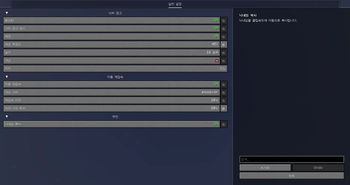
PICO Helper
Introduction
An advanced utility mod that improves your experience on picosv.kr.
Features
- Provides a configuration screen through Mod Menu
- Calculates the player's fall-damage height
- Includes advanced configuration options
- Saves and loads settings from the
configfolder
FAQ
Why should I use this mod?
PICO Helper makes the server experience more convenient by allowing you to customize features, calculate fall-damage height, and adjust various advanced options.
Dependencies
- Fabric API
- Mod Menu
- YACL - Used for the configuration screen
KO-KR Description
소개
picosv.kr 서버를 더 편하게 이용할 수 있도록 도와주는 고급 유틸리티 모드입니다.
기능
- Mod Menu를 통한 설정 화면 제공
- 플레이어의 낙하 데미지 발생 높이 계산
- 다양한 고급 설정 옵션 제공
config폴더에 설정 저장 및 불러오기 지원
자주 묻는 질문
왜 이 모드를 사용해야 하나요?
PICO Helper는 모든 기능들을 원하는 대로 조정하고, 낙하 데미지 높이를 계산하며, 다양한 고급 설정을 통해 서버 이용 경험을 더 편리하게 만들어줍니다.
의존성
- Fabric API
- Mod Menu
- YACL - 설정 화면에 사용됩니다
Quick facts
- Edition: Minecraft Java
- File type: .jar
- Minecraft version listed: 1.21.4
- How to install: Install the matching mod loader (Forge, Fabric or NeoForge) for your Minecraft version. → Download the .jar. → Put it in the .minecraft/mods folder and launch that loader profile.
- Where to get it: Opens on Modrinth — not every file is mirrored on our own servers.
Install steps are the general flow for this file type — How to install Minecraft Java mods & modpacks walks through it step by step.
Verified by MCModsHub
- Ships as picohelper-1.4.1.jar — drop this file into the mods folder
- Download size: 49 KB
- Download link checked 22 Aug 2026 — working
These come from our own check of the pack file, not from the source page.