
KantoStarters
Configurable Cobblemon starter and reward choice stations with custom dialogues, previews, one-time choices, commands and default starter screen control.
⬇ Download on Modrinth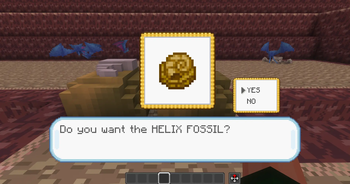
KantoStarters
KantoStarters is a Fabric/Cobblemon utility mod that lets creators build configurable choice stations using normal Minecraft blocks.
This mod was originally created for the CobbleKanto project, but it can also be used by other server owners and map creators who want a custom starter, reward, or one-time choice system for their own Cobblemon worlds.
KantoStarters does not add physical blocks of its own. Instead, it lets you bind existing blocks from your map to configured choices. Those choices can be used for starter selection, dojo-style rewards, fossil choices, special creature gifts, custom item rewards, or any other map event where the player must choose one option from a configured set.
Get 25% off your Minecraft server with Shockbyte! Ready to start an epic adventure with your friends? Just click here or on the banner and use promo code “COBBLEKANTO”, plus you’ll be helping us keep improving the mod and developing future projects!
Features
- Custom starter and reward choice system
- Configurable choice sessions through JSON files
- Bind any normal Minecraft block to a configured choice
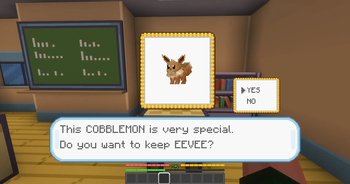
- Custom dialogue screen with YES/NO confirmation
- 3D Cobblemon preview support
- Item preview support for item-based choices
- One-time choice protection
- Optional blocking if the player already has a Cobblemon
- Optional control over the default Cobblemon starter screen
- Language-based dialogue files for different player languages
System Overview
KantoStarters uses configurable choice sessions.
Each session can contain multiple choices, but each physical block is linked to one specific option.
For example, a classic starter table can be built with three blocks:
- one block linked to
start / bulbasaur - one block linked to
start / charmander - one block linked to
start / squirtle
When the player right-clicks one of these bound blocks, a custom dialogue screen opens with a preview, dialogue text, and a YES/NO confirmation.
If the player confirms the choice, the mod can run commands, give items, and mark that session as completed for that player.
Show setup and configuration details
Setup
Before binding a block in the world, you need to create or edit a choice session in the config file:
config/kantostarters/choice_sessions.json
A choice station is based on two IDs:
sessionId— the group of choices, such asstart,dojo, ormtmoonchoiceId— the specific choice inside that session, such asbulbasaur,charmander, orhelix_fossil
Example:
{
  "sessionId": "start",
  "enabled": true,
  "oneTimeChoice": true,
  "blockIfAlreadyHasCobblemon": false,
  "textColour": "#3050c8",
  "secondConfirmLines": [],
  "choices": [
    {
      "choiceId": "bulbasaur",
      "displayName": "Bulbasaur",
      "previewSpecies": "bulbasaur",
      "dialogId": "start_bulbasaur_dialog",
      "dialogLines": [],
      "itemRewards": [],
      "previewScale": 1.0,
      "previewOffsetX": -1,
      "previewOffsetY": 4,
      "commands": [
        "pokegive %player% bulbasaur level=5"
      ]
    }
  ]
}
Recommended setup order:
- Create or edit the session in
choice_sessions.json. - Create the
sessionIdand thechoiceId. - Run
/kantostarters reload. - Look directly at the block you want to bind.
- Run
/kantostarters set <sessionId> <choiceId>. - Test the choice with
/kantostarters open <sessionId> <choiceId>if needed.
Example:
/kantostarters set start bulbasaur
After that, players can right-click the block to open that specific choice.
To remove a binding from the block you are looking at:
/kantostarters unset
All setup commands require operator/admin permission.
Config Files
On first launch, KantoStarters creates its config files inside:
config/kantostarters/
Main files:
choice_sessions.jsonchoice_dialog_arrays_en_us.jsonchoice_dialog_arrays_pt_br.json
By default, the mod includes example sessions for:
start— Bulbasaur, Charmander, and Squirtledojo— Hitmonlee and Hitmonchanceladoneevee— Eeveemtmoon— Helix Fossil and Dome Fossil
These are only default examples. You can edit, remove, expand, or replace them with your own custom sessions.
Always create the session and choice in choice_sessions.json before using /kantostarters set.
Sessions
Each session controls a group of related choices.
Example:
{
  "sessionId": "start",
  "enabled": true,
  "oneTimeChoice": true,
  "blockIfAlreadyHasCobblemon": false,
  "textColour": "#3050c8",
  "secondConfirmLines": [],
  "choices": []
}
sessionId
The internal session name. It is used in commands such as:
/kantostarters set start bulbasaur
enabled
If set to false, the session cannot be used.
oneTimeChoice
If set to true, each player can complete that session only once.
After confirming a choice, the player receives internal tags such as:
ks_done_startks_choice_start_bulbasaur
blockIfAlreadyHasCobblemon
If set to true, players who already have a Cobblemon in their party or PC cannot use this session.
This is useful for starter systems where you do not want players to claim a starter after already receiving or catching something.
textColour
Controls the dialogue text color.
secondConfirmLines
Optional extra confirmation dialogue.
This is useful when you want a second warning before the final choice is locked in.
Choices
Each choice controls one selectable option inside a session.
Example:
{
  "choiceId": "bulbasaur",
  "displayName": "Bulbasaur",
  "previewSpecies": "bulbasaur",
  "dialogId": "start_bulbasaur_dialog",
  "dialogLines": [],
  "itemRewards": [],
  "previewScale": 1.0,
  "previewOffsetX": -1,
  "previewOffsetY": 4,
  "commands": [
    "pokegive %player% bulbasaur level=5"
  ]
}
choiceId
The internal ID of the choice.
displayName
The name shown and used by the choice screen.
previewSpecies
Controls the preview shown in the choice screen.
For Cobblemon previews, use a species ID:
"previewSpecies": "bulbasaur"
For item previews, use a full item ID:
"previewSpecies": "cobblemon:helix_fossil"
dialogId
The ID used to load dialogue lines from the dialogue config files.
Example:
"dialogId": "start_bulbasaur_dialog"
dialogLines
Fallback dialogue lines used if no dialogId is found.
itemRewards
Direct item rewards.
Example:
"itemRewards": [
  {
    "itemId": "minecraft:diamond",
    "count": 1
  }
]
If the player's inventory is full, leftover items are dropped near the player.
Preview settings
previewScale, previewOffsetX, and previewOffsetY control the visual position and size of the preview inside the choice screen.
These are useful when a model or item appears too big, too small, too high, or too low.
commands
Commands executed when the player confirms the choice.
Example:
"commands": [
  "pokegive %player% bulbasaur level=5"
]
Supported placeholders:
%player%— player name%uuid%— player UUID%choice%— selected choice ID%session%— session ID
Commands are executed by the server with admin permission.
Dialog Files
KantoStarters generates separate dialog files for different languages:
config/kantostarters/choice_dialog_arrays_en_us.jsonconfig/kantostarters/choice_dialog_arrays_pt_br.json
Example:
{
  "start_bulbasaur_dialog": [
    "I see! BULBASAUR is your choice.",
    "It's very easy to raise.",
    "So, [player], you want to go with",
    "the GRASS COBBLEMON BULBASAUR?"
  ]
}
Supported placeholders:
[player][choice_display][choice_id][preview_species]
The mod automatically tries to use the player's selected Minecraft language.
If a matching dialogue file is not found, it falls back to en_us.
You can add more languages by creating files using the same format.
Example:
config/kantostarters/choice_dialog_arrays_es_es.json
Dialogue Formatting
Dialogue lines are automatically wrapped for the custom choice screen.
For best results, keep each line short and readable.
You can also use:
/p
as a page break inside dialogue arrays.
Example:
{
  "example_dialog": [
    "This is the first page.",
    "/p",
    "This is the second page."
  ]
}
Starter Screen
KantoStarters can control whether the default Cobblemon starter selection screen is allowed to open.
To enable the default starter screen:
/kantostarters DefaultPickStarters on
To disable the default starter screen:
/kantostarters DefaultPickStarters off
If you are using KantoStarters as your main starter selection system, you will probably want:
/kantostarters DefaultPickStarters off
This lets your custom choice stations handle starter selection instead.
Important:
KantoStarters does not automatically give a starter on join by itself. You should build and configure your own starter area, bind the desired blocks, and decide how players access those choices.
Commands
Reload configs:
/kantostarters reload
Shows basic debug info:
/kantostarters debug
Lists configured sessions and choices:
/kantostarters list
Bind the block you are looking at:
/kantostarters set <sessionId> <choiceId>
Remove the binding from the block you are looking at:
/kantostarters unset
Open a choice directly for testing:
/kantostarters open <sessionId> <choiceId>
Enable or disable blocking players who already have a Cobblemon for a session:
/kantostarters BlockIfAlreadyHasCobblemon <sessionId> <true|false>
Enable the default Cobblemon starter screen:
/kantostarters DefaultPickStarters on
Disable the default Cobblemon starter screen:
/kantostarters DefaultPickStarters off
Reset all KantoStarters choice tags for the player running the command:
/kantostarters reset all
Reset one session for the player running the command:
/kantostarters reset <sessionId>
All commands require operator/admin permission.
Use Cases
KantoStarters can be used for more than just the first starter selection.
It works well for:
- starter rooms
- dojo rewards
- fossil choices
- one-time gift creatures
- item reward stations
- quest rewards
- map progression rewards
- server event rewards
- custom adventure map choices
Known Issues
- KantoStarters is a config-based mod. Incorrect session IDs, choice IDs, item IDs, or command syntax may prevent a choice from working correctly.
- If
DefaultPickStartersis turned off but no custom starter station is configured, players may not receive a starter through the default Cobblemon screen.
Compatibility & Dependencies
- Minecraft 1.21.1
- Fabric Loader 0.17.2+
- Fabric API
- Java 21
- Cobblemon
FAQ
Does KantoStarters work without Cobblemon?
No. KantoStarters requires Cobblemon.
Does this mod add new blocks or models?
No. KantoStarters does not add physical blocks, but you can bind any block (even invisible barriers) as a choice option.
Why is my choice not opening?
Check these things:
- The mod is installed on both client and server.
- The session exists in
choice_sessions.json. - The choice exists inside that session.
- The block was bound with
/kantostarters set. - The player is not sneaking while right-clicking.
- The session is enabled.
- The player has not already completed a one-time session.
- The config was reloaded after editing.
Why did my reward command not work?
Check the command syntax in choice_sessions.json.
Do not include a leading /.
Example:
"commands": [
  "give %player% minecraft:diamond 1"
]
Then run:
/kantostarters reload
Special Thanks
- To everybody helping polish the CobbleKanto project and its custom mods.
- To the Cobblemon community for inspiring more adventure-focused Minecraft experiences.
If you have ideas or feedback, you can share them through our public issue tracker or send a direct message to "cobblekanto" at Discord.
Gigante pela própria natureza 🇧🇷
KantoStarters is an unofficial fan-made Minecraft mod.
This project is not affiliated with, endorsed by, sponsored by, or approved by Nintendo, Game Freak, Creatures Inc., The Pokémon Company, Mojang Studios, Microsoft, or the Cobblemon team.
Minecraft is a trademark of Microsoft Corporation. Pokémon and related names are trademarks of their respective owners. Cobblemon belongs to its respective creators.
- Edition: Minecraft Java
- File type: .jar
- Minecraft version listed: 1.21.1
- How to install: Install the matching mod loader (Forge, Fabric or NeoForge) for your Minecraft version. → Download the .jar. → Put it in the .minecraft/mods folder and launch that loader profile.
- Where to get it: Opens on Modrinth — not every file is mirrored on our own servers.
Install steps are the general flow for this file type — How to install Minecraft Java mods & modpacks walks through it step by step.
- Ships as kantostarters-0.0.4.jar — drop this file into the mods folder
- Download size: 118 KB
- Download link checked 1 Sept 2026 — working
These come from our own check of the pack file, not from the source page.