
Assorted Pebbles
Java mod listed for Minecraft 26.x. Downloads from the MC Java Mods app on Android.
⬇ Download on ModrinthWhat does this mod do?
This mod adds pebbles to the game!
 Stone Pebble
 Andesite Pebble
 Diorite Pebble
 Granite Pebble
 Deepslate Pebble
 Flint Shard
These items can be collected by Shift + Right Clicking Dirt! (Flint comes from Gravel)
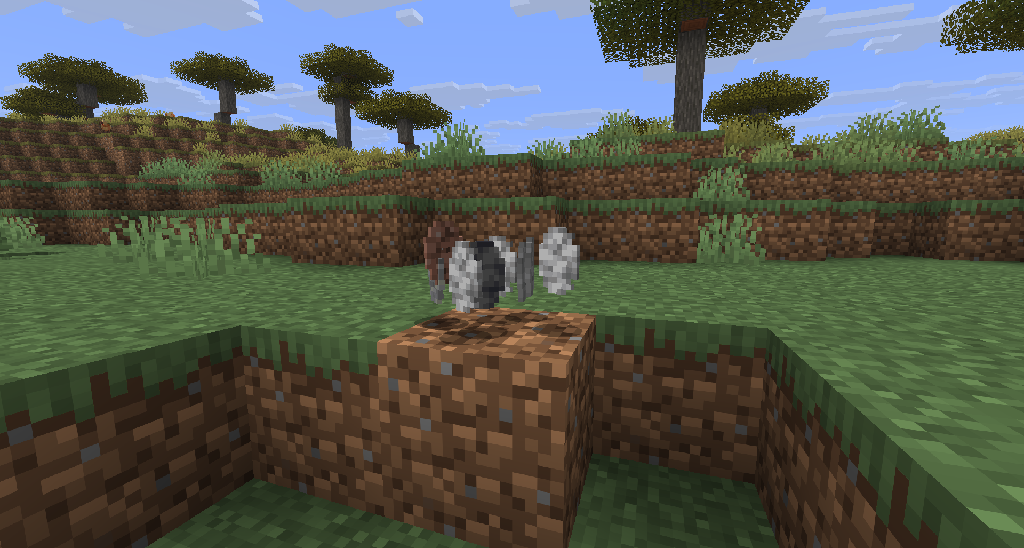
What are Pebbles good for?
Pebbles can be combined into their respective block in a 4x4 Crafting Grid.
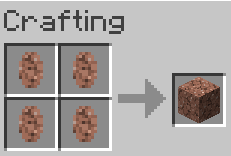
Great for Challenge Modpacks!
Additionally, this mod is completely customizable through its config file! You can set it up so that absolutely any item can drop from any block you want. You aren't limited to just one or two loot tables either. Feel free to create as many as you need!
The default config file:
["Assorted Pebbles Config"]
	#How many game ticks between each pebble drop while holding Shift + Right-Click.
	# Default: 5
	# Range: 1 ~ 100
	tickCooldown = 5
	#Configure your loot pools as individual block entries.
	#You can create as many as you want!
	#Format:
	#  [ "target_block_or_tag",
	#      """\
	#      "item1:chance1,
	#      item2:chance2,
	#      etc"
	#      """
	#  ],
	lootPools = [
["#minecraft:dirt",
       """\
       assortedpebbles:stone_pebble:0.45,
       assortedpebbles:andesite_pebble:0.12,
       assortedpebbles:diorite_pebble:0.12,
       assortedpebbles:granite_pebble:0.12,
       assortedpebbles:deepslate_pebble:0.05
       """
],
["minecraft:gravel",
       """\
       assortedpebbles:flint_shard:0.1,
       minecraft:flint:0.02
       """
]]
- Edition: Minecraft Java
- File type: .jar
- Minecraft version listed: 26.2
- How to install: Install the matching mod loader (Forge, Fabric or NeoForge) for your Minecraft version. → Download the .jar. → Put it in the .minecraft/mods folder and launch that loader profile.
- Where to get it: Opens on Modrinth — not every file is mirrored on our own servers.
Install steps are the general flow for this file type — How to install Minecraft Java mods & modpacks walks through it step by step.
- Ships as Assorted Pebbles v1.0.2.jar — drop this file into the mods folder
- Download size: 44 KB
- Download link checked 24 Oct 2026 — working
These come from our own check of the pack file, not from the source page.