
gamerule-gui
Java mod listed for Minecraft 1.20. Downloads from the MC Java Mods app on Android.
⬇ Download on Modrinth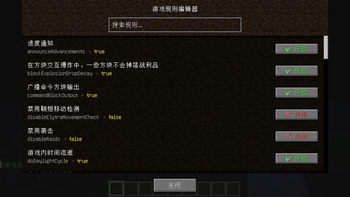
Gamerule GUI Mod
🤖 AI-assisted creation — This mod was created by Gaobaiawa with DeepSeek V4-Flash
A Fabric mod that opens a graphical interface via /gamerule-gui to view and modify all game rules.
Features
- Graphical interface: Type
/gamerule-guito open the rule editor — no need to memorize commands - Visual toggles: Boolean rules display as buttons, click to switch true/false
- Number input: Integer rules display as input fields, type values directly
- Live search: Search by English rule names or Chinese translations
- Multi-language: UI and chat messages follow Minecraft language settings (EN/ZH)
- No permission barrier: Anyone can open the GUI to view rules; editing requires OP rights
- Mod Menu integration: Config entry point when Mod Menu is installed
- Chat log control:
/gamerule-gui showlog falseto disable operation feedback
Commands
| Command | Description |
|---|---|
/gamerule-gui |
Open the game rule editor |
/gamerule-gui showlog <true/false> |
Enable/disable chat feedback |
How to Use
- Install Fabric Loader and Fabric API
- Put the mod jar into
.minecraft/mods/ - Join a world and type
/gamerule-gui(requires OP level 2) - Click buttons to toggle rules or type values into input fields
Non-OP players can open the GUI to view rules but cannot modify them.
Requirements
- Minecraft 1.20.1
- Fabric Loader >=0.14.24
- Fabric API (recommended, not required)
FAQ
Q: Does the server need this mod? A: Yes. The mod has both client and server components — the command won't work without it on the server.
Q: Does it conflict with other mods? A: No. It doesn't modify any vanilla classes, purely event-driven.
Q: Are rule changes saved?
A: Yes. Changes are saved to the world file, just like using the /gamerule command.
Download
License
- Edition: Minecraft Java
- File type: .jar
- Minecraft versions listed: 1.20.1, 1.20.2, 1.20.3
- How to install: Install the matching mod loader (Forge, Fabric or NeoForge) for your Minecraft version. → Download the .jar. → Put it in the .minecraft/mods folder and launch that loader profile.
- Where to get it: Opens on Modrinth — not every file is mirrored on our own servers.
Install steps are the general flow for this file type — How to install Minecraft Java mods & modpacks walks through it step by step.
- Ships as gamerule-mod-1.0.0.jar — drop this file into the mods folder
- Download size: 23 KB
- Download link checked 24 Oct 2026 — working
These come from our own check of the pack file, not from the source page.