
FadeClose
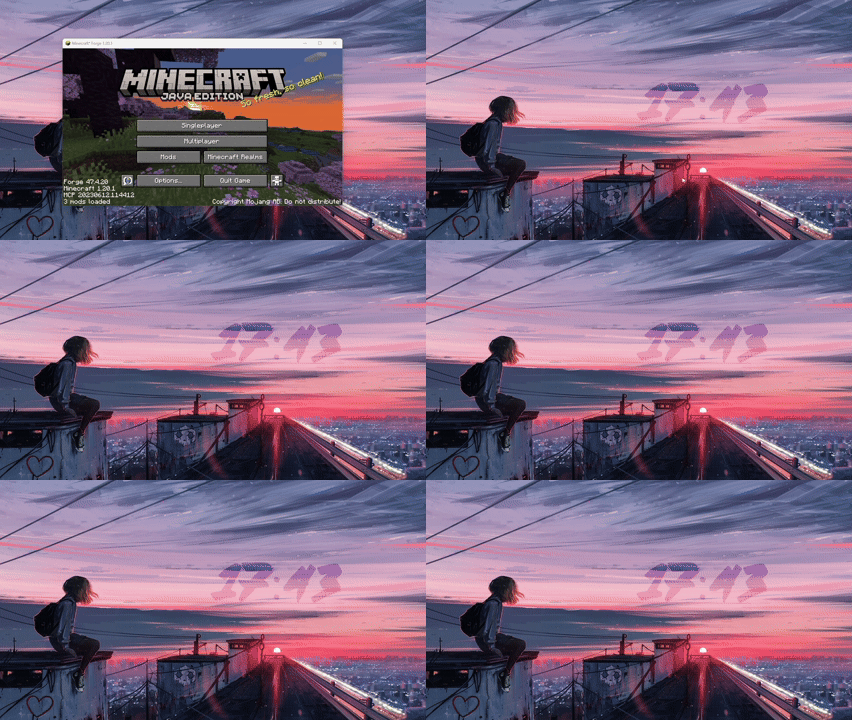
Adds a smooth fade-out animation when closing Minecraft, inspired by the game OneShot. Works with the X button, Alt+F4, and the in-game quit button.
⬇ Download on ModrinthFadeClose
Inspired by the indie game OneShot, this mod adds a smooth fade-out animation whenever you close Minecraft. Instead of the window abruptly shutting down, it will gradually become transparent and softly disappear — making the closing experience feel polished and satisfying.
How it works
The fade-out animation triggers no matter how you close the game:
Clicking the X button Pressing Alt+F4 Using the in-game Quit button
Compatibility
Minecraft: Java Edition 1.20.1 – 1.20.6 Mod loader: Forge Side: Client only — no server needed
- Edition: Minecraft Java
- File type: .jar
- Minecraft versions listed: 1.20.1, 1.20.2, 1.20.3
- How to install: Install the matching mod loader (Forge, Fabric or NeoForge) for your Minecraft version. → Download the .jar. → Put it in the .minecraft/mods folder and launch that loader profile.
- Where to get it: Opens on Modrinth — not every file is mirrored on our own servers.
Install steps are the general flow for this file type — How to install Minecraft Java mods & modpacks walks through it step by step.
- Ships as FadeClose-1.2-1.20.1.jar — drop this file into the mods folder
- Download size: 63 KB
- Download link checked 8 Sept 2026 — working
These come from our own check of the pack file, not from the source page.