
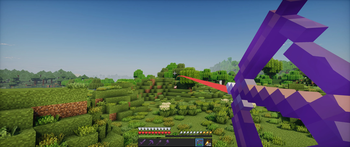
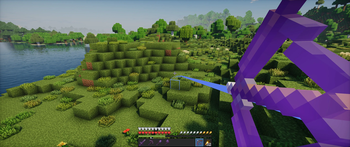
Sightline
A client-side Fabric mod that allows you to view the path of your projectiles before you shoot them.


Features
- Calculates and renders the exact trajectory of your projectile.
- Dynamically highlights the predicted impact point (blue for blocks, red for entities).
- Optional Immersive Colors setting to color-match the trajectory line to the projectile (e.g., teal for tridents, green for ender pearls).
- Configurable Visibility Modes: Hold (default), Toggle or Always Show.
- Customizable trajectory line thickness and toggleable impact hitbox rendering.
- Supports bows, crossbows, tridents, snowballs, eggs, ender pearls and splash potions.
- Fully client-side; works perfectly on multiplayer servers.
Usage
By default, hold Left Alt while holding a projectile item to display its predicted path. You can change this behavior to "Toggle" or "Always" in the configuration menu.
The keybind can be changed in the Minecraft controls menu under the "Misc" category.
Configuration
Sightline supports ModMenu for in-game configuration. You can also manually edit the config/projectiles.json file.
Available settings:
- Immersive Colors: Color-matches the trajectory line to the projectile item.
- Visibility Mode: Choose how the trajectory is shown (Hold key, Toggle with key or Always).
- Show Hitboxes: Toggles the wireframe outline of the block or entity at the predicted impact point.
- Line Thickness: Adjust the thickness of the trajectory line (Thin, Normal, Thick).
Installation
- Install Fabric Loader for Minecraft 1.21.10.
- Download the Fabric API mod.
- Download the latest compiled
.jarfrom the Releases page. - Place both
.jarfiles into your.minecraft/modsfolder.
Requirements
- Minecraft 1.21.10
- Fabric Loader 0.19.2+
- Fabric API
- ModMenu (Optional, for in-game configuration)
License
This project is licensed under the GNU General Public License v3.0 (GPL-3.0).
- Edition: Minecraft Java
- File type: .jar
- Minecraft versions listed: 1.21.10, 1.21.11
- How to install: Install the matching mod loader (Forge, Fabric or NeoForge) for your Minecraft version. → Download the .jar. → Put it in the .minecraft/mods folder and launch that loader profile.
- Where to get it: Opens on Modrinth — not every file is mirrored on our own servers.
Install steps are the general flow for this file type — How to install Minecraft Java mods & modpacks walks through it step by step.
- Ships as projectiles-1.1.1.jar — drop this file into the mods folder
- Download size: 109 KB
- Download link checked 20 Aug 2026 — working
These come from our own check of the pack file, not from the source page.