
Sound Pulse
A minimalist client-side mod that visualizes sound direction through distance-scaling HUD waves and critical threat alerts for enhanced tactical awareness.
I don't know my version or loader
🔊 SoundPulse
SoundPulse is a lightweight, high-performance client-side utility mod for Minecraft Fabric 26.1.x. It visualizes in-game sounds as minimalist, directional waves on your HUD, providing a tactical edge and enhanced spatial awareness without the clutter of vanilla subtitles.
Whether you are playing with your own music, have hearing difficulties, or simply want a cleaner way to track threats, SoundPulse delivers a sleek, modern solution.
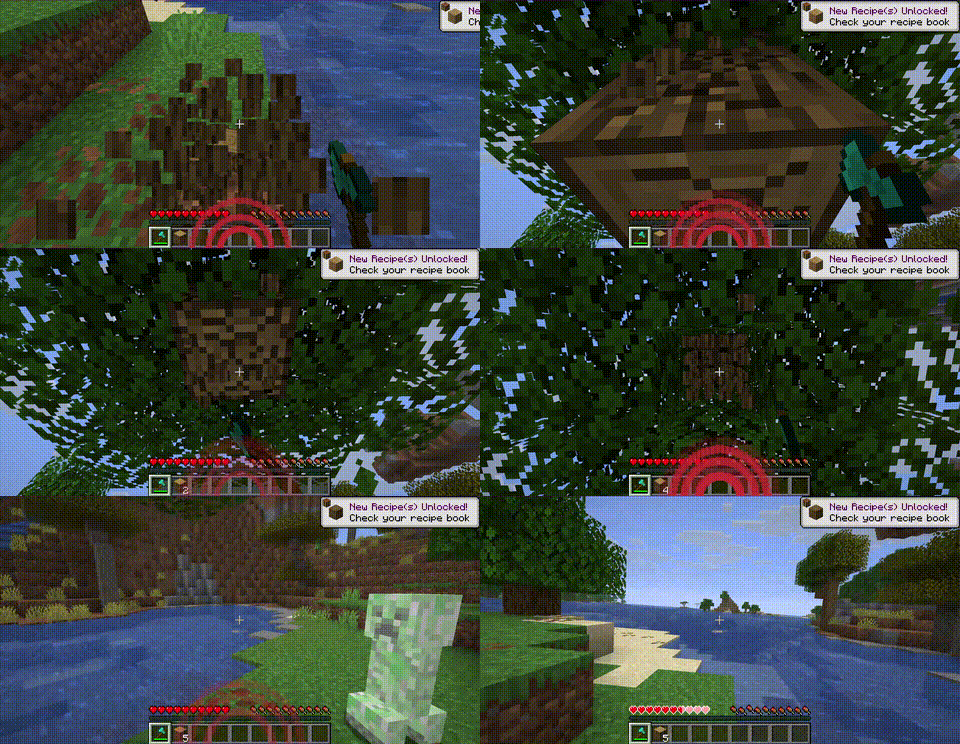
✨ Key Features
🧭 8-Way Directional Tracking
SoundPulse doesn't just tell you a sound happened — it shows you exactly where it came from. The HUD displays curved wave icons pointing to 8 specific directions:
- Front, Back, Left, Right
- Front-Right, Front-Left, Back-Right, Back-Left
📏 Distance-Based Scaling
The visual intensity of the waves adapts to the proximity of the sound source:
- Near: Thick, aggressive lines for immediate threats
- Far: Thin, subtle lines for distant background noises
⚠️ Critical Threat Alerts (Strobe Effect)
Never get blindsided by a Creeper again. High-priority sounds like Creeper hissing or TNT priming trigger a rapid red strobe/flash effect on the corresponding direction of the HUD.
🛡️ Smart Filtering & Presets
To keep your screen clean, SoundPulse starts with Hostile sounds enabled by default. You can easily toggle other categories (Blocks, Players, Ambient, Music, Weather, Neutral, Voice) to suit your playstyle.
🎨 Category Colors
Each sound category has a distinct color:
| Category | Color |
|---|---|
| Hostile | Red |
| Blocks | Orange |
| Ambient | Green |
| Players | Blue |
| Music | Purple |
| Weather | Cyan |
| Neutral | Yellow |
| Voice | Gray |
💻 Commands
SoundPulse is fully configurable in-game. Every change you make is instantly saved to your configuration file.
| Command | Description |
|---|---|
/soundpulse toggle |
Enable or disable the mod entirely |
/soundpulse config |
View your current settings and active categories in chat |
/soundpulse category <name> <true/false> |
Toggle entire sound categories on or off |
/soundpulse color <category> <hex> |
Change the wave color for a specific category |
/soundpulse ignore add <id> |
Add a specific sound to the ignore list |
/soundpulse ignore remove <id> |
Remove a sound from the ignore list |
/soundpulse ignore list |
List all ignored sounds |
⚙️ Configuration
Settings are saved to config/soundpulse.json:
{
  "enabled": true,
  "maxOpacity": 0.65,
  "enabledCategories": ["HOSTILE"],
  "categoryColors": {},
  "ignoredSounds": []
}
Only the HOSTILE category is enabled by default. Use /soundpulse category to enable others.
📄 License
MIT © Cukkoo
- Edition: Minecraft Java
- File type: .jar
- Minecraft versions listed: 26.1, 26.1.1, 26.1.2
- How to install: Install the matching mod loader (Forge, Fabric or NeoForge) for your Minecraft version. → Download the .jar. → Put it in the .minecraft/mods folder and launch that loader profile.
- Where to get it: Opens on Modrinth — not every file is mirrored on our own servers.
Install steps are the general flow for this file type — How to install Minecraft Java mods & modpacks walks through it step by step.
- Ships as soundpulse-forge-1.0.0.jar — drop this file into the mods folder
- Download size: 140 KB
- Download link checked 10 Sept 2026 — working
These come from our own check of the pack file, not from the source page.