
Damage Indicator YS
Java mod listed for Minecraft 26.x. Downloads from the MC Java Mods app on Android.
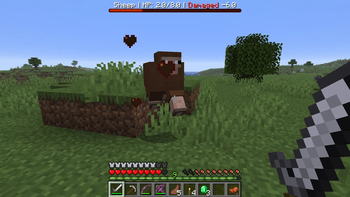
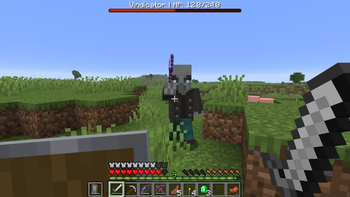
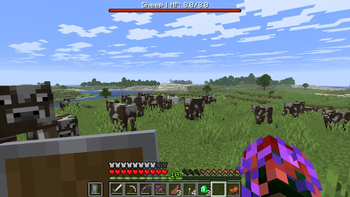
Adds a clean red bossbar health display for the entity you’re looking at, with readable damage, healing, and health feedback.
I don't know my version or loader

Damage Indicator YS
Focus Mode Design
Damage Indicator YS is designed as a low-clutter alternative to floating health text datapacks.
Instead of showing health above every nearby entity, it only displays information for the entity you are actively looking at. This keeps the screen cleaner while still giving useful combat feedback.
Features
- Clean red bossbar health indicator
- Shows the entity name and HP
- Displays recent damage as
Damaged -X - Displays recent healing as
Healed +X - Briefly shows 0 HP when a tracked entity dies
- Multiplayer-friendly per-player bossbar system
- Optional player targeting, disabled by default
- No resource pack required
Commands
Use these commands after installing or reloading the datapack:
/function dmi:systems/info
/function dmi:systems/install
/function dmi:systems/refresh
/function dmi:systems/repair
/function dmi:systems/uninstall
Roadmap
Version 1.0 focuses on the clean bossbar-based display.
Future updates may expand the datapack with more optional display modes, better configuration controls, combat memory tracking, and additional server-friendly customization.
Support
If you enjoy the datapack and want to support future Minecraft projects from ManaMage and Yazsras Studios, donation links are available on the project page.
- Edition: Minecraft Java
- File type: .jar
- Minecraft versions listed: 26.1, 26.1.1, 26.1.2
- How to install: Install the matching mod loader (Forge, Fabric or NeoForge) for your Minecraft version. → Download the .jar. → Put it in the .minecraft/mods folder and launch that loader profile.
- Where to get it: Opens on Modrinth — not every file is mirrored on our own servers.
Install steps are the general flow for this file type — How to install Minecraft Java mods & modpacks walks through it step by step.
- Ships as damage-indicator-ys-1.0.0.jar — drop this file into the mods folder
- Download size: 631 KB
- Download link checked 16 Oct 2026 — working
These come from our own check of the pack file, not from the source page.