
Ez Backpacks
Java mod listed for Minecraft 26.x. Downloads from the MC Java Mods app on Android.
⬇ Download on Modrinth
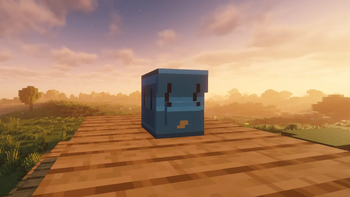

Ez Backpacks
Ez Backpacks adds colorful wearable backpacks with portable storage, custom inventory slots, seasonal events, and immersive vanilla-style mechanics to Minecraft!
Designed to feel like a natural part of Minecraft survival, Ez Backpacks gives players early-game portable storage before shulker boxes, while keeping balanced progression and fun quality-of-life features.
Features
Wearable Backpacks
- Equip backpacks in a dedicated backpack slot
- Backpacks appear on the player’s back
- Open backpacks directly with the B key
- Shift-click support for quick equipping
Portable Storage
- Normal backpacks with 27 slots
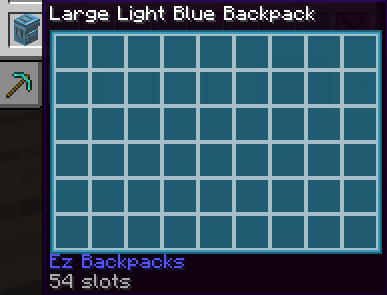
- Large backpacks with 54 slots
- Keep stored items when broken, similar to shulker boxes
- Place backpacks in the world with Shift + Right Click
- Open backpacks from your hand or while placed
Color Variants
- Backpacks available in all Minecraft colors
- Colored backpack inventories and tooltips
- Separate textures and models for normal and large variants
Seasonal Easter Eggs
- Christmas backpacks during December 25–31
- Easter bunny backpacks during Easter
- Halloween pumpkin backpacks during Halloween
- Seasonal variants work as items, blocks, and worn backpacks
Backpack Upgrades
- Special backpack upgrades with unique mechanics
- Redstone backpacks can interact with redstone-powered blocks
Survival-Friendly
- Recipe unlocking support
- Advancement: Packed and Ready!
- Prevents backpacks and shulker boxes from being stored inside backpacks
- Balanced for survival gameplay
Full Language Support
- Fully translated into every Minecraft language
- Includes LOLCAT and Pirate Speak
Ez Backpacks focuses on polish, immersion, and vanilla-style gameplay while expanding Minecraft’s storage system in a fun and creative way.
- Edition: Minecraft Java
- File type: .jar
- Minecraft version listed: 26.1.2
- How to install: Install the matching mod loader (Forge, Fabric or NeoForge) for your Minecraft version. → Download the .jar. → Put it in the .minecraft/mods folder and launch that loader profile.
- Where to get it: Opens on Modrinth — not every file is mirrored on our own servers.
Install steps are the general flow for this file type — How to install Minecraft Java mods & modpacks walks through it step by step.
- Ships as ezbackpack-1.0.0.jar — drop this file into the mods folder
- Download size: 315 KB
- Download link checked 17 Oct 2026 — working
These come from our own check of the pack file, not from the source page.