
ModsJava
Aesthetic Elytras
Java mod listed for Minecraft 1.20. Downloads from the MC Java Mods app on Android.
⬇ Download on Modrinth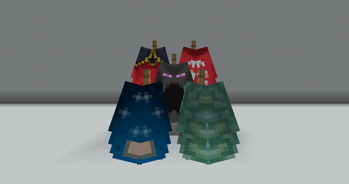
Usage
- Install the mod on your client (download it from modrinth)
- Rename your elytra - see Textures for options
- Display it in an armour stand!
Textures
Files are stored lowercase and only with _, . or -, but the mod will transform uppercase and with space names to be acceptable.
For example, you can name your elytra Minecon 2016, and that will be equivalent to the minecon-2016 file.
Built-in Textures
baconbirthdaycobaltcopperdbexperiencefollowershomemcc-15-yearmenancemigratormillionthminecon-2011minecon-2011_alt1minecon-2011_alt2minecon-2011_alt3minecon-2012minecon-2013minecon-2014minecon-2015minecon-2016pancapeprismarinepurple-heartrealmsscrollssnowmanspadestudiosturtlevalentinesvanillayearn
Custom Textures
You can add custom textures by adding a .png file following the aforementioned name guidelines to the folder aestheticelytras/textures/cape_textures with a resource pack.
Quick facts
- Edition: Minecraft Java
- File type: .jar
- Minecraft version listed: 1.20.4
- How to install: Install the matching mod loader (Forge, Fabric or NeoForge) for your Minecraft version. → Download the .jar. → Put it in the .minecraft/mods folder and launch that loader profile.
- Where to get it: Opens on Modrinth — not every file is mirrored on our own servers.
Install steps are the general flow for this file type — How to install Minecraft Java mods & modpacks walks through it step by step.
File checked by MCModsHub
- Ships as AestheticElytras-1.0.jar — drop this file into the mods folder
- Download size: 51 KB
- Download link checked 25 Oct 2026 — working
These come from our own check of the pack file, not from the source page.