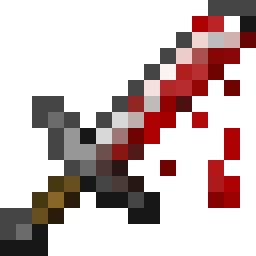
BloodyParticlesMod
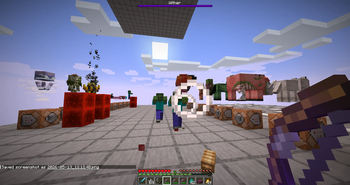
Make every hit feel meaningful. Mobs splash thematic blood and impact particles when damaged different effects per mob, scaling with attack charge and…
⬇ Download on Modrinth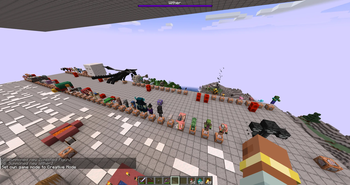
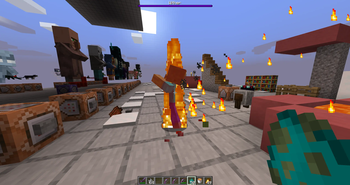
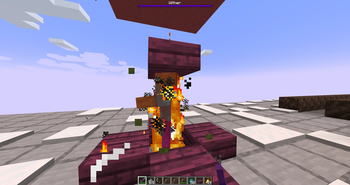
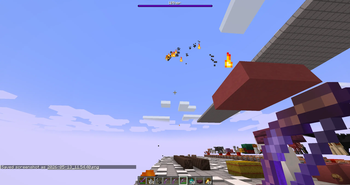
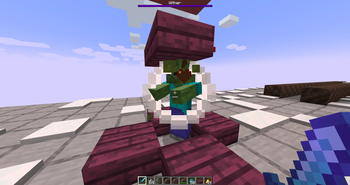
Compatibility: works on NeoForge, Forge and Fabric, for Minecraft 1.20.1 and 1.21.1. 100% client-side — install it on your client and join any vanilla server.
In-game config: the NeoForge version has a native config screen and needs nothing extra. For the Forge 1.20.1 and Fabric versions, configuring in-game needs the Cloth Config API (Fabric also uses Mod Menu for the button) — this is optional: the mod works fine without it and falls back to editing the
.tomlconfig file.
Add-ons & modded mobs
If you're looking to have the same particle effects with mobs in some popular mods like Born in Chaos, check out my own add-on, which is compatible with many mods. BloodyParticles Add-ons
BloodyParticles
Make every hit feel meaningful. Mobs splash thematic blood and impact particles when damaged — different effects per mob, scaling with attack charge and critical hits.
Features
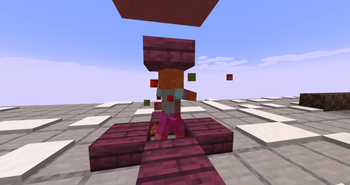
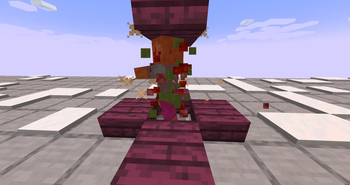
- 74 vanilla mobs covered out of the box, each with their own thematic effect (zombie redstone-blood, bee honey, blaze flame, axolotl pink-dye, ...).
- 100% client-side — works on any vanilla server, no server install needed.
- Runs on NeoForge, Forge and Fabric (Minecraft 1.20.1 and 1.21.1) from a single, unified codebase — same effects on every loader.
- Configurable in-game: config GUI with sliders for intensity, view radius, critical multiplier. English / Spanish.
- Hit-aware: particle count scales with attack charge and critical hits.
- Custom particles: registers its own (e.g. falling feathers for chickens and parrots) with proper sprite-based physics.
This mod is a rework of a datapack that did the same thing but wasn't very user-friendly when it came to scaling the project, nor was it particularly efficient. You can view the datapack here:
This release expands BloodyParticles from a mob-blood mod into a full visual feedback layer for combat, movement, enchantments, and projectiles. Every effect below can be toggled or fine-tuned from the in-game config GUI (Mods → BloodyParticles → Config) — including thresholds, intensities, and texture variants.
Damage Source Variants
Mobs now react to how they're hit, not just that they were hit:
- Fire (flame + small_flame), Lava (flame + lava drops), Drowning (bubble pops), Suffocation (stone block crack)
- Poison → custom green skull smoke (rising, fading)
- Wither → custom black skull smoke
- Freezing → custom snowflakes (rotating, drifting)
Defaults apply to every mob automatically. Addon resourcepacks can override per mob.
Animated Custom Particles
Custom particles now support multi-frame animation via standard mcmeta. Drop name_0.png, name_1.png, ... and list them in the particles JSON — feather, skulls, snowflake, and ender pearl particles all animate automatically when given multiple frames.
Low-HP Visuals
- Red vignette overlay with two texture variants (V1 subtle / V2 bloody) and configurable HP threshold (1–99%).
- Blood particles that pulse sparsely below the threshold and become continuous below half-threshold, with adjustable intensity.
Player Movement Effects
- Sprint trail — campfire smoke behind you, with configurable warmup time. Works while riding a mount (horse galloping). Auto-skipped on ice and snow.
- Falling trail — white smoke streaming behind during freefall.
- Landing burst — smoke + dust + stone shards on impact (3+ block falls).
- Water entry splash — biome-tinted water chunks + snow foam + dolphin sound on jumping into water.
Each can be toggled independently.
Shield Block
Wood + crit particles project forward in your look direction when blocking an attack — fully reliable even when the shield absorbs 100% of damage, and it works for any item that blocks the vanilla way, including modded shields.
Enchanted Arrows (Bow)
- Flame: fire + smoke trail; bigger flame + lava + large_smoke burst on mob impact.
- Power:
enchanted_hit+ witch trail (count scales with level);sweep_attack+dragon_breathburst on impact. - Detection works for any combination of both enchants on the same arrow.
Fire Aspect (Sword)
Melee hits with a Fire-Aspect-enchanted weapon trigger the same flame burst as Flame arrows.
- Knockback / Punch Wave;
Shockwave with swords and a bow, featuring the knockback and punch enchantments.
Boot Enchantments
- Feather Falling — 2–5 feathers on landing.
- Frost Walker — snowflakes + occasional
end_rodsparks at your feet over water. - Soul Speed — soul + dust_plume on soul sand / soul soil. Configurable intensity.
- Depth Strider — bubble, fishing, dolphin, and small white air particles around your legs underwater. Configurable intensity.
Ender Pearl
- Custom wave_enderpearl anchored at each pearl tick — grows + fades, creating a "tunnel" along the pearl's path.
- Custom dot_enderpearl scattering with dispersion.
- Portal + occasional
dragon_breathas the magical undertone. - Teleport burst of all of the above when the pearl impacts and teleports you.
On-Fire
Any burning mob (or player) emits flames and smoke. Fire-immune mobs (blaze, magma cube, ghast, wither) are skipped automatically. Configurable intensity.
Everything is configurable
The mod ships with an in-game config screen (native on NeoForge; via Cloth Config on Forge and Fabric) — every feature in this list has its own toggle, and many expose sliders for thresholds, frequencies, and intensity.
- Don't like an effect? Disable it.
- Want it more dramatic? Crank the slider.
- Hot-reloadable from the GUI: changes apply instantly without restarting.
Add-ons & modded mobs
BloodyParticles is fully extensible through add-on resource packs — no coding required. A simple blood_definitions/*.json file maps any entity to its own blood and impact particles, so you can add thematic effects for modded mobs with the exact same per-mob control the built-in mobs get. If another mod adds new creatures, an add-on makes them bleed too.
BloodyParticles Add-ons — drop-in blood definitions that extend BloodyParticles to modded mobs.
v4.0 - What's new
- Now on NeoForge, Forge and Fabric
BloodyParticles used to be NeoForge-only. It now runs on NeoForge, Forge and Fabric, for Minecraft 1.20.1 and 1.21.1 — the same feature set on every combination. The whole mod was reworked onto a single shared codebase (Architectury + Stonecutter), so effects behave identically across loaders and new Minecraft versions are much cheaper to support going forward.
- In-game config on every loader
- NeoForge: native config screen, no extra mods.
- Forge 1.20.1 / Fabric: in-game config through Cloth Config (Fabric also uses Mod Menu for the button). Optional — without them the mod still works and reads its
.toml.
- Reworked shield-block detection
The result is rock-solid in both singleplayer and multiplayer, and it now works automatically with modded shields — any item that blocks the vanilla way triggers the effect, with no per-item setup.
- Multiplayer verified on all loaders
The full client-side multiplayer layer (other players' movement, enchantment, projectile and combat effects) is verified across all four loader/version combinations — still 100% client-side, still compatible with any vanilla server.
- Edition: Minecraft Java
- File type: .jar
- Minecraft version listed: 1.21.1
- How to install: Install the matching mod loader (Forge, Fabric or NeoForge) for your Minecraft version. → Download the .jar. → Put it in the .minecraft/mods folder and launch that loader profile.
- Where to get it: Opens on Modrinth — not every file is mirrored on our own servers.
Install steps are the general flow for this file type — How to install Minecraft Java mods & modpacks walks through it step by step.
- Ships as bloodyparticles-fabric-1.21.1-4.0.0.jar — drop this file into the mods folder
- Download size: 366 KB
- Download link checked 7 Sept 2026 — working
These come from our own check of the pack file, not from the source page.