
Repair Request
Java mod listed for Minecraft 1.21. Downloads from the MC Java Mods app on Android.
⬇ Download on Modrinth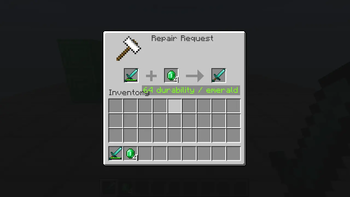
Repair Request
A repairman villager service for emerald-based item repairs.
Repair Request adds a dedicated repairman profession and an anvil-style service screen. It is designed for packs that want damaged or broken gear to be repaired through a villager service without spending player experience.
What it does
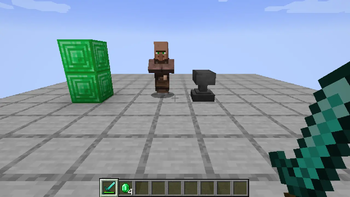
- Adds a Repairman villager profession.
- Uses anvils, chipped anvils, and damaged anvils as the repairman's job-site blocks.
- Opens a repair screen when interacting with a repairman.
- Uses an anvil-style UI: damaged item on the left, payment in the second slot, repaired output on the right.
- The payment slot accepts only emeralds and emerald blocks.
- Repairing consumes no player experience.
- Default repair amount is 64 durability per emerald.
- Repair amount can be configured as either a fixed durability value or a percentage of the item's max durability.
Lightman's Currency compatibility
When Lightman's Currency is installed, Repair Request adds button-based repair actions for Lightman's money handlers:
- Repair (LC) spends one configured emerald-value payment unit.
- Repair All (LC) spends as much as needed, up to full repair or available funds.
The Lightman's Currency integration uses Lightman's default main coin chain value: 1 repair unit = 1 emerald coin = 1000 LC core value. The standalone default payment anchor is lightmanscurrency:coin_emerald, matching Lightman's original economy. Modpacks that intentionally replace Lightman's economy with vanilla emeralds can set lightmanPaymentItem to minecraft:emerald.
Notes for pack makers
This mod only adds the repair service. It does not prevent item deletion at zero durability by itself. Pair it with a durability-preservation mod such as Keep My Sword if you want broken items to remain in the player's inventory and be repairable later.
Source and issues
- Edition: Minecraft Java
- File type: .jar
- Minecraft version listed: 1.21.1
- How to install: Install the matching mod loader (Forge, Fabric or NeoForge) for your Minecraft version. → Download the .jar. → Put it in the .minecraft/mods folder and launch that loader profile.
- Where to get it: Opens on Modrinth — not every file is mirrored on our own servers.
Install steps are the general flow for this file type — How to install Minecraft Java mods & modpacks walks through it step by step.
- Ships as repair_request-neoforge-0.1.0.jar — drop this file into the mods folder
- Download size: 26 KB
- Download link checked 21 Oct 2026 — working
These come from our own check of the pack file, not from the source page.