HomeJavaModsCombat Toggle
Combat Toggle
ModsJava

Combat Toggle

by otectus · on Modrinth

Combat Toggle is a lightweight server-side PvP control mod that prevents accidental or unwanted player combat by requiring mutual opt-in before PvP damage…

⬇ Download on Modrinth
Combat Toggle — screenshot 1Combat Toggle — screenshot 2

Combat Toggle

A server-installable PvP opt-in system with combat tagging, smart cooldowns, and a full admin toolkit — for Minecraft 1.19.2 Forge.

Combat Toggle lets every player on your server choose whether they can be attacked. It's a ship-it-on-a-modpack solution for the "some players want PvP, some don't" problem — no world-border workarounds, no region plugins, no third-party dependencies. Install it on your dedicated server and vanilla clients can join and use /ct without touching their game.


What it does


Features

Core

Social

Player commands

No permissions required.

Command Purpose
/ct Toggle Combat ↔ Peace.
/combat Set yourself to Combat mode.
/peace Set yourself to Peace mode.
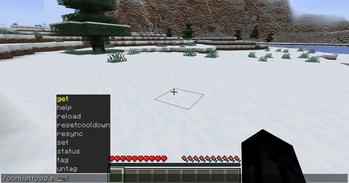
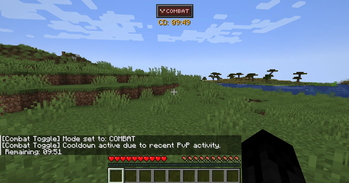
/combattoggle status Show your own mode, tag, and cooldown.
/combattoggle help List every command you can run (admin entries hidden for non-OP).

Admin commands

Require OP level 2.

Command Purpose
/combattoggle get <player> Inspect another player's state.
/combattoggle set <player> <peace|combat> [bypass] Force a mode. bypass=true overrides cooldown + tag guard.
/combattoggle tag <player> [seconds] Apply a combat tag manually (1–3600s).
/combattoggle untag <player> Clear a combat tag.
/combattoggle resetcooldown <player> Clear both toggle and PvP cooldowns.
/combattoggle resync Refresh scoreboard teams and resync HUD state for everyone online (/combattoggle reload is an alias).

Server/Modpack Info


Installation

  1. Install Minecraft Forge 43.3.0+ for Minecraft 1.19.2.
  2. Drop combattoggle-1.2.0.jar into your server's (or client's) mods/ folder.
  3. Launch. On first run, combattoggle-server.toml is generated in your world's serverconfig/ directory and combattoggle-client.toml in the client config folder.

Server-installable? Yes. Install on the dedicated server only and vanilla clients can join and use /ct, /combat, /peace, and /combattoggle status with no client-side install. Players who additionally install the mod client-side get the V keybind and the HUD indicator on top — eye candy over the same server-authoritative logic.


Configuration

Key Default What it does
cooldownSeconds 600 Cooldown duration (10 min). Set to 0 to disable cooldown entirely.
combatTagSeconds 30 How long a combat tag lasts after a PvP event.
requireBothCombatEnabled true If true, PvP only works when both attacker and target are in Combat.
forceCombatWhileTagged true Force tagged players into Combat mode.
allowToggleWhileTagged false If false, Combat-tagged players cannot switch to Peace.
cooldownTriggersOnPvp true Cooldown starts when a player deals or takes PvP damage.
cooldownTriggersOnToggle false Cooldown starts when a player toggles.
cooldownAppliesToPeaceOnly true Cooldown only blocks Combat→Peace; Peace→Combat is always instant.
allowAdminBypassCooldown true bypass=true on /combattoggle set actually works.
useScoreboardTeams true Disable to keep Combat Toggle out of the scoreboard entirely.
useEmojiPrefixes / useNameplateColors true / true Independent toggles for the two visual effects.
combatEmoji / peaceEmoji / Any BMP Unicode.
combatTeamName / peaceTeamName ct_combat / ct_peace Rename to avoid clashes.
Key Default What it does
hudEnabled true Master switch for the HUD icon.
hudShowInCombatMode true Show the icon while in Combat mode.
hudShowInPeaceMode true Show the icon while in Peace mode.
hudAnchor TOP_CENTER One of TOP_LEFT, TOP_CENTER, TOP_RIGHT, CENTER_LEFT, CENTER, CENTER_RIGHT, BOTTOM_LEFT, BOTTOM_CENTER, BOTTOM_RIGHT, CUSTOM.
hudOffsetX 0 Inward pixel offset from the anchor. Absolute screen X if hudAnchor=CUSTOM.
hudOffsetY 6 Inward pixel offset from the anchor. Absolute screen Y if hudAnchor=CUSTOM.
hudScale 1.0 Range 0.5–3.0.
hudShowTimers true Show tag/cooldown countdown text below the icon.

Upgrading


Compatibility


Known Limits


License & Source

Pull requests and bug reports welcome. Please include server logs, your combattoggle-server.toml, and a minimal repro when filing an issue.

Quick facts

Install steps are the general flow for this file type — How to install Minecraft Java mods & modpacks walks through it step by step.

Verified by MCModsHub

These come from our own check of the pack file, not from the source page.

Explore more