BL Custom Death Sounds
Java mod listed for Minecraft 26.x. Downloads from the MC Java Mods app on Android.
Choose ANY Minecraft sound effect to play on player death. Search sounds, preview them instantly, and customize volume & pitch.
⬇ Download on Modrinth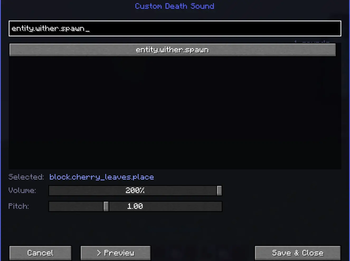
💀 Custom Death Sound
Turn every death message into absolute chaos.
Custom Death Sound lets you choose ANY Minecraft sound event to play whenever someone dies in chat. From Wither spawns to goat screams, explosions, anvils, music disc sounds, or even the most cursed vanilla audio imaginable — if Minecraft can play it, this mod can use it.
No resource packs. No commands. No editing config files manually.
Just open the menu, search for a sound, preview it instantly, and save it as your death sound.
✨ Features
- 🔎 Search through all Minecraft sound events
- 🎵 Use virtually any built-in Minecraft sound as a death sound
- 🔊 Adjustable volume slider
- 📈 Adjustable pitch slider
- ▶️ Instant sound preview button
- 💬 Detects tons of vanilla-style death messages
- ⚡ Lightweight client-side mod
- 🧩 Clean custom UI with scrolling sound browser
- 🎮 Works great for SMPs, trolling, chaos, content creation, and memes
🎧 Examples
Some funny sound ideas:
- Wither spawn
- Creeper explosion
- Goat scream
- Villager no
- Anvil land
- Ender dragon growl
- TNT prime
- Warden sonic boom
- XP pickup
- Cat meow
🖥️ How To Use
- Open ModMenu and search BL Custom Death Sounds
- Open the mod config screen
- Search for any sound
- Click a sound to select it
- Adjust volume & pitch
- Preview it
- Save and enjoy the chaos 💀
📦 Notes
- Client-side only
- Uses Minecraft's built-in sound registry
- Supports thousands of vanilla sound events
- Sound IDs can be searched instantly in-game
- Edition: Minecraft Java
- File type: .jar
- Minecraft versions listed: 26.1, 26.1.1, 26.1.2
- How to install: Install the matching mod loader (Forge, Fabric or NeoForge) for your Minecraft version. → Download the .jar. → Put it in the .minecraft/mods folder and launch that loader profile.
- Where to get it: Opens on Modrinth — not every file is mirrored on our own servers.
Install steps are the general flow for this file type — How to install Minecraft Java mods & modpacks walks through it step by step.
- Ships as customdeathsound-26.1.jar — drop this file into the mods folder
- Download size: 25 KB
- Download link checked 19 Oct 2026 — working
These come from our own check of the pack file, not from the source page.