
snapcam
Placeable camera for Minecraft fabric 1.21.1 — enter its view, shoot handheld, or use the self-timer. No commands, no custom keybinds. Inspired by the…
⬇ Download on Modrinth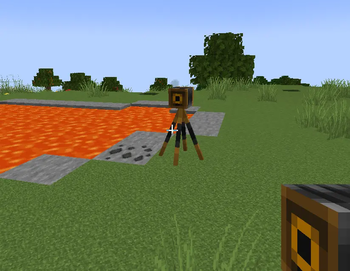
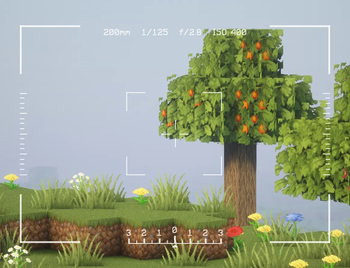
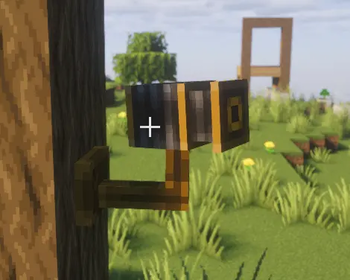
Snapcam
Snapcam adds a placeable camera to Minecraft. Point it at a scene, then shoot in whichever style suits the moment:
- Handheld — hold the camera item, crouch and press Use to enter handheld mode, then shoot at any time while crouching. Release crouch to exit.
- Live view — place the camera in the world, walk up to it, and step inside: look around freely, zoom in/out, and shoot whenever you're ready.
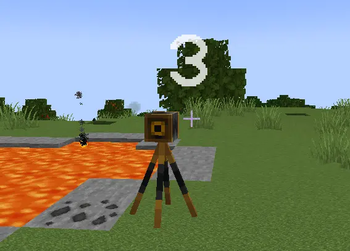
- Self-timer — place the camera, crouch-click it from close range to start a 5-second countdown, then get into the shot before it fires.
No commands. No custom keybinds — only Use and Sneak. Works on controllers and Steam Deck.
Inspired by the Minecraft: Education Edition camera. Requires Fabric on Minecraft: Java Edition 1.21.1, installed on both server and client.
Features
Placing a camera
Hold the Camera item (creative inventory → Tools & Utilities) and press Use on any block face:
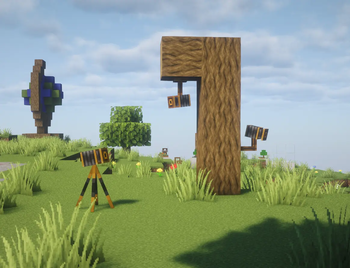
- On a flat surface — places a tripod camera on the ground, lens facing toward you.
- On a side face — mounts the camera to the wall, lens pointing outward.
- On the underside of a block — mounts the camera to the ceiling. A centred plate grips the block above; a rod hangs down to the pan/tilt head.
The camera is a server-side entity: every player on the server sees it.
Entering camera view
Use an unoccupied camera to switch your POV to it. While inside:
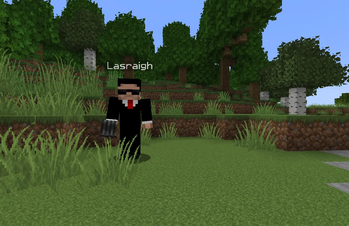
- Your character stays at its original position (visible to other players and in your own screenshots).
- Mouse / stick input rotates the camera view.
- Scroll wheel or W / S zooms in and out (12–200 mm equivalent focal length, shown in the viewfinder HUD). Zoom is saved per camera and restored the next time any player enters it. The lens barrel extends on the model as a visual cue.
- All movement input is suppressed — the camera is fixed.
- The vanilla HUD (hotbar, crosshair, health bar) is hidden.
- Press Sneak to exit and return to your own body.
Only one player can occupy a camera at a time.
Taking a screenshot
| Situation | Input | Result |
|---|---|---|
| Inside camera view | Use / trigger | Screenshot from camera POV |
| Inside camera view | Scroll / W / S | Zoom in or out |
| Outside, holding Camera item | Hold Shift + Use (not aimed at a camera) | Enters hand-held mode — Use to shoot, release Shift to exit |
| Outside, holding Camera item (within ~20 blocks of a camera) | Shift + Use the camera | 5-second countdown, then auto-shot from that camera |
Screenshots are saved by Minecraft's normal screenshot system
(screenshots/ folder, sequential numbering). A white flash confirms each
shot.
Timed shot (self-timer)
Step close to a placed camera you are not inside and Shift + Use it. A large countdown number (5 → 1) appears on screen. After five seconds the mod briefly enters the camera's POV, takes the screenshot, and returns you to normal play — so you can step in front of the camera before it fires.
The timer cancels automatically if the targeted camera is removed or claimed by another player.
Removing a camera
Hit the camera entity to break it. It drops the Camera item regardless of who placed it.
Compatibility
| Mod | Status |
|---|---|
| Xaero's Minimap | Supported — minimap is hidden while in camera view |
| Mod Menu | Supported — mod appears in the list (no config screen yet) |
| Controlify | Supported — set Sneak to held mode (not toggle) in Controlify settings |
| Other HUD mods | May render on top of camera view; MIT licensed, feel free to patch |
Requires the mod on both server and client. The POV switch is coordinated server-side; clients without the mod cannot accidentally enter camera view on a modded server.
Recommended server setting — interaction range
Holding the Camera item extends entity interaction range to ~20 blocks on the client, allowing timed shots to be triggered from across a room. On Paper servers, raise the server-side limit to match so the extended reach isn't silently clamped:
# paper-global.yml
misc:
  max-entity-reach: 20.0
On a Fabric server the equivalent is provided by the Reach Entity Attributes mod.
Dependencies
| Dependency | Side | Required |
|---|---|---|
| Fabric Loader ≥ 0.15 | Both | Yes |
| Fabric API 0.116.x + 1.21.1 | Both | Yes |
| Mod Menu | Client | No (recommended) |
License
MIT — © 2026 Lasrach lasrach@gmail.com
- Edition: Minecraft Java
- File type: .jar
- Minecraft version listed: 1.21.1
- How to install: Install the matching mod loader (Forge, Fabric or NeoForge) for your Minecraft version. → Download the .jar. → Put it in the .minecraft/mods folder and launch that loader profile.
- Where to get it: Opens on Modrinth — not every file is mirrored on our own servers.
Install steps are the general flow for this file type — How to install Minecraft Java mods & modpacks walks through it step by step.
- Ships as snapcam-0.3.0.jar — drop this file into the mods folder
- Download size: 116 KB
- Download link checked 20 Aug 2026 — working
These come from our own check of the pack file, not from the source page.