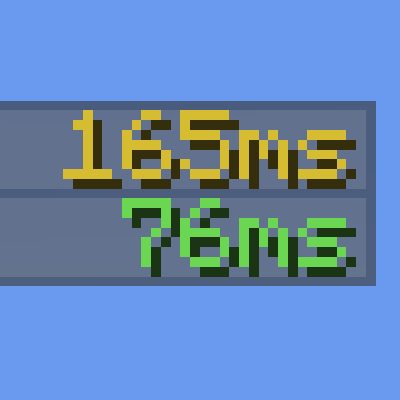
BetterMS is a lightweight client-side Fabric mod that improves the player list by replacing the default ping bar indicators with the actual ping value displayed in milliseconds. Instead of guessing your connection quality from a set of bars, you get a precise numerical readout that updates in real time.
The mod color-codes each ping value based on latency thresholds, making it easy to identify connection quality at a glance. Low latency values appear in green, moderate values in yellow, and high latency values in red, following a consistent and intuitive color scale.
BetterMS is designed to be completely unobtrusive. It has no configuration screen by default on most versions, requires no setup beyond installation, and adds no overhead to your game. It runs entirely on the client side, meaning it works on any server without requiring the mod to be installed server-side.
Requirements
- Fabric Loader
- No additional dependencies required for most versions
Installation
Download the release matching your Minecraft version and place the .jar file into your mods folder. Launch the game using the Fabric profile and the mod will load automatically. No additional configuration is needed.
Author
Developed and maintained by sjgamer92og. For issues or feedback, visit the project page on Modrinth.
- Edition: Minecraft Java
- File type: .jar
- Minecraft version listed: 1.21.11
- How to install: Install the matching mod loader (Forge, Fabric or NeoForge) for your Minecraft version. → Download the .jar. → Put it in the .minecraft/mods folder and launch that loader profile.
- Where to get it: Opens on Modrinth — not every file is mirrored on our own servers.
Install steps are the general flow for this file type — How to install Minecraft Java mods & modpacks walks through it step by step.
- Ships as BetterMS 1.21.11.jar — drop this file into the mods folder
- Download size: 22 KB
- Download link checked 6 Sept 2026 — working
These come from our own check of the pack file, not from the source page.