ModsJava
GarnierArmor
Enhanced armor durability display for Minecraft See precise durability values with color coded warnings directly on your HUD
⬇ Download on Modrinth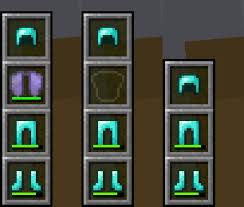
GarnierArmor
Enhanced armor durability display for Minecraft. See precise durability values with color-coded warnings directly on your HUD.
This Fabric mod collection includes two mods: Garnier Core Library (dependency loader) and GarnierArmor (armor durability HUD display).
Features
- Precise Values: Exact durability numbers (current/max) and percentages
- Color Warnings: Green (>75%), Yellow (50-75%), Orange (25-50%), Red (<25%)
- Real-time Updates: Instant display when taking damage or repairing
- All Armor Pieces: Shows helmet, chestplate, leggings, and boots separately
- ModMenu Support: Configuration screen with feature overview
Requirements
- Minecraft 1.21.11
- Fabric Loader 0.16.9+
- Fabric API 0.107.0+
- Java 21+
Installation
- Install Fabric Loader
- Download Fabric API
- Place both JAR files in your
modsfolder:garnierarmor-1.0.0.jar
Building
gradlew.bat build
Compiled mods:
armor-durability/build/libs/garnierarmor-1.0.0.jar
Development
gradlew.bat runClient
License
MIT License - See LICENSE file
Developed by Garnier
Quick facts
- Edition: Minecraft Java
- File type: .jar
- Minecraft version listed: 1.21.11
- How to install: Install the matching mod loader (Forge, Fabric or NeoForge) for your Minecraft version. → Download the .jar. → Put it in the .minecraft/mods folder and launch that loader profile.
- Where to get it: Opens on Modrinth — not every file is mirrored on our own servers.
Install steps are the general flow for this file type — How to install Minecraft Java mods & modpacks walks through it step by step.
Verified by MCModsHub
- Ships as garnierarmor-1.0.0.jar — drop this file into the mods folder
- Download size: 54 KB
- Download link checked 11 Sept 2026 — working
These come from our own check of the pack file, not from the source page.