
Furnace ETA hud
Java mod listed for Minecraft 1.21. Downloads from the MC Java Mods app on Android.
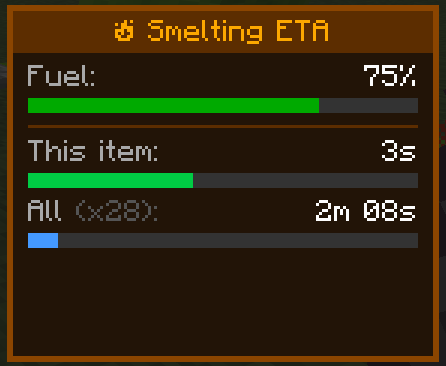
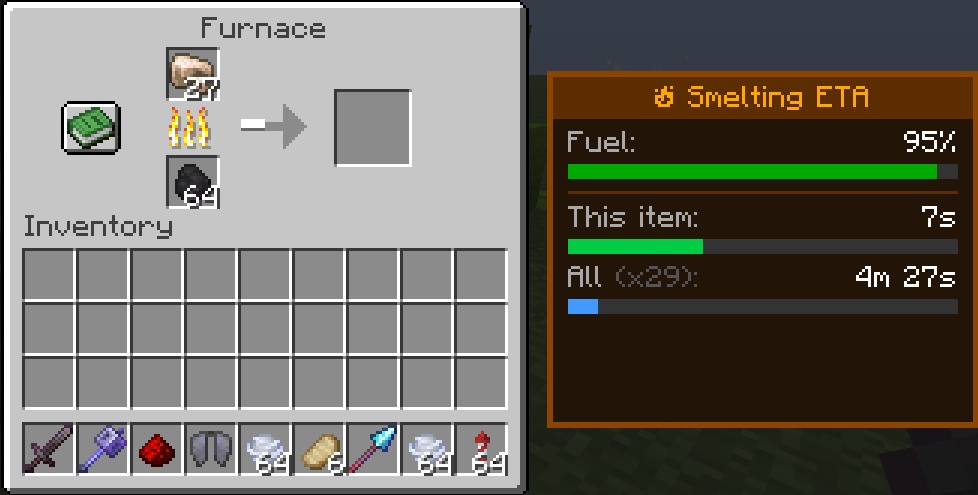
Adds a clean and immersive Smelting ETA panel to furnaces, blast furnaces, and smokers, showing exact smelt times, fuel efficiency, and total completion…
I don't know my version or loader
⏳ Furnace ETA
Furnace ETA adds a sleek side-panel HUD to Minecraft furnaces that displays precise smelting information at a glance.
No more guessing how long your items will take — the mod shows live timers, fuel status, and total batch completion estimates in a clean vanilla-friendly interface.
Perfect for survival players, technical players, builders, and anyone tired of waiting blindly for furnaces to finish.
✨ Features
Real-time smelting countdowns Shows remaining time for the current item Calculates total time for the entire stack Fuel efficiency percentage display Works with: Furnaces Blast Furnaces Smokers Lightweight and clean UI Vanilla-style design Client-side QoL mod
🖥️ Displayed Information
Fuel remaining % Current item ETA Total batch ETA Progress bars for quick visual reading
🎮 Why Use Furnace ETA?
Minecraft already shows smelting progress visually, but not accurately.
Furnace ETA gives exact timing information without opening F3 menus, calculators, or external tools. The HUD is designed to feel like something that could exist in vanilla Minecraft while still being incredibly useful.
⚙️ Compatibility
Fabric Client-side Works in singleplayer and multiplayer servers No server installation required
🧡 Designed for Vanilla+
The goal of Furnace ETA is simple:
Make furnaces feel smarter without changing vanilla gameplay.
No automation. No balance changes. Just better information.
📔Credits
A HUGE help was taken by Claude
- Edition: Minecraft Java
- File type: .jar
- Minecraft versions listed: 1.21.10, 1.21.11
- How to install: Install the matching mod loader (Forge, Fabric or NeoForge) for your Minecraft version. → Download the .jar. → Put it in the .minecraft/mods folder and launch that loader profile.
- Where to get it: Opens on Modrinth — not every file is mirrored on our own servers.
Install steps are the general flow for this file type — How to install Minecraft Java mods & modpacks walks through it step by step.
- Ships as furnaceeta-1.0.0.jar — drop this file into the mods folder
- Download size: 29 KB
- Download link checked 20 Oct 2026 — working
These come from our own check of the pack file, not from the source page.