
Create: Galvanized
Improve your Iron & Steel equipment with Zinc! Galvanization adds much more durability and a bit more enchantability to tools and armor. Getting Started…
⬇ Download on ModrinthImprove your Iron & Steel equipment with Zinc! Galvanization adds much more durability and a bit more enchantability to tools and armor.
Getting Started
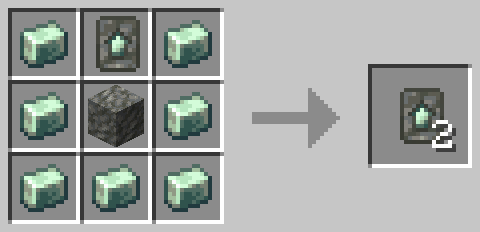
First you'll need to get a Galvanized Upgrade Smithing Template, which can be obtained from mineshafts, village blacksmith or pillager outpost chests. Once you have it, it can easily be duplicated with Zinc Ingots and Tuff.
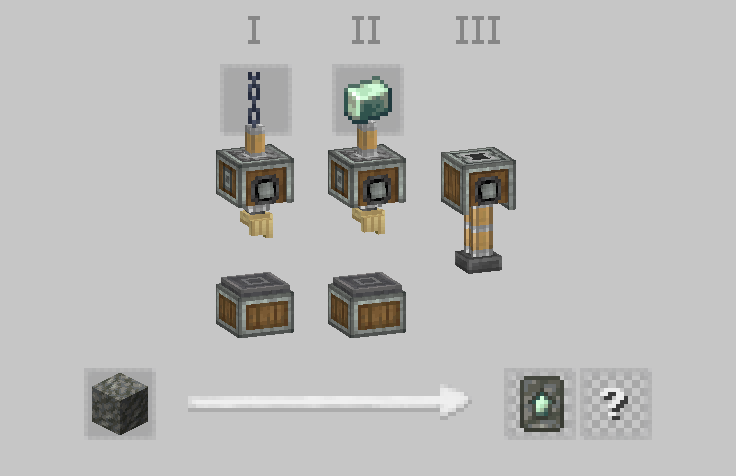
It can also be created from scratch using a sequenced assembly recipe.
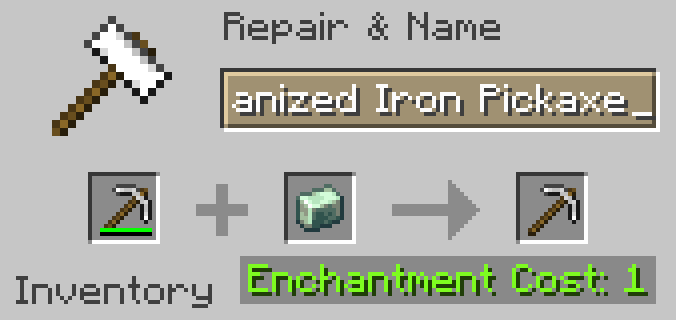
To upgrade your equipment, simply put it in a Smithing Table along with the template and a Zinc Ingot.
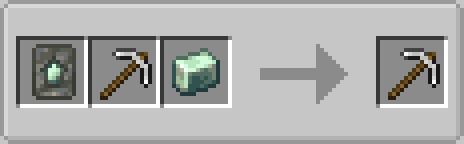
Galvanized equipment can also be repaired with Zinc Ingots alongside their default repair material (configurable via tag).
Galvanization is generally more effective on tools than armor. While galvanized tools have 60% more durability, galvanized armor only has about 33% more, however it does have a slightly higher enchantability bonus.
Requirements:
Create (required). For galvanized Steel equipment, you will need Create: Alloyed (optional).
- Edition: Minecraft Java
- File type: .jar
- Minecraft version listed: 1.20.1
- How to install: Install the matching mod loader (Forge, Fabric or NeoForge) for your Minecraft version. → Download the .jar. → Put it in the .minecraft/mods folder and launch that loader profile.
- Where to get it: Opens on Modrinth — not every file is mirrored on our own servers.
Install steps are the general flow for this file type — How to install Minecraft Java mods & modpacks walks through it step by step.
- Ships as galvanized-1.20.1-1.0.2.jar — drop this file into the mods folder
- Download size: 351 KB
- Download link checked 21 Aug 2026 — working
These come from our own check of the pack file, not from the source page.