
Sol's Item Rarity
Adds a fully configurable rarity tier system to all items in Minecraft! Assign rarity tiers to any item from vanilla Minecraft or any mod, and watch as…
⬇ Download on Modrinth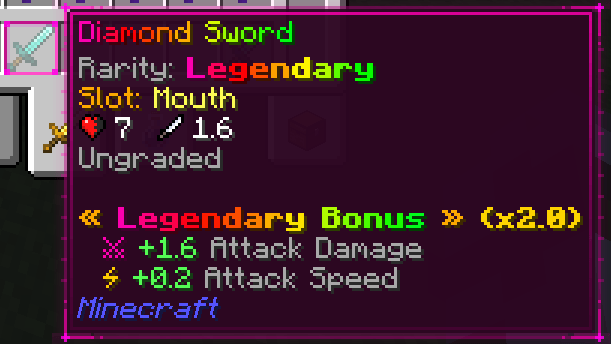
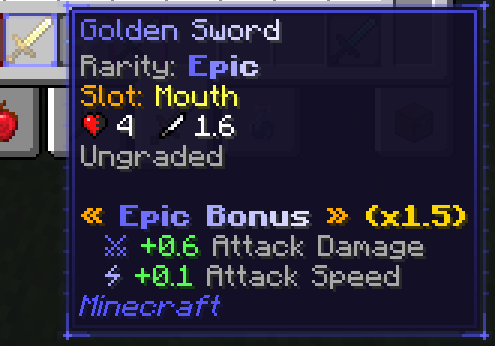
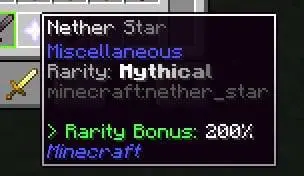
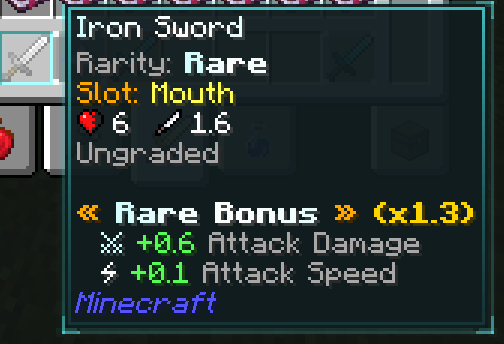
Sol’s Item Rarity Mod (Forge 1.16.5 & 1.20.1)
Advanced RPG Rarity System | Attribute Scaling | Fully Configurable
Author: solmochi
Recommended Addon: Sol’s Relic System
Support
Need help, want to suggest a feature, or found a bug?
Join our community to catch exclusive early previews and upcoming changelogs before they go live!

Turn Minecraft Into a True RPG Experience
Sol’s Item Rarity Mod adds a fully customizable RPG-style rarity system to Minecraft.
Every weapon, armor piece, and item can have unique rarity tiers, stat bonuses, animated visuals, and persistent attributes.
- Randomized loot progression
- Scalable item stats
- Works with ALL mods
- Fully configurable JSON system
- Multiplayer-ready (server sync supported)
Key Features
Dynamic Rarity System
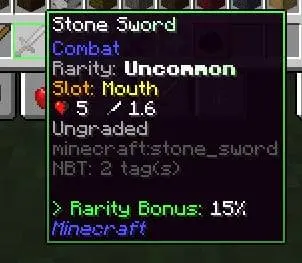
- Weapons & armor roll random rarity on first use
- Items store rarity using NBT (persistent per item instance)
- Same item can have different rarities
Visual Enhancements
- Animated chroma item names
- Rarity-colored inventory & hotbar borders
- Multi-layer UI effects (glow, bevel, sparkle for high tiers)
- Tooltip borders match rarity
Attribute Scaling System
- Items gain stat bonuses based on rarity
- Fully configurable multipliers
- Auto-applies stats to all weapons & armor (including modded)
Fully Configurable
- JSON-based configs for:
- Rarity chances
- Fixed rarities
- Attributes
- Set-based items
- Works with any mod using
modid:itemname
Multiplayer Support
- Server configs auto-sync to all players
/sr reloadupdates everyone instantly- No client-side desync issues
Rarity Tiers
| Tier | Multiplier | Effects |
|---|---|---|
| Common | 1.0x | No effects |
| Uncommon | 1.15x | Light chroma |
| Rare | 1.25x | Enhanced color |
| Epic | 1.5x | Strong chroma |
| Legendary | 2.0x | Animated borders |
| Mythical | 3.0x | High-tier visuals |
| Supreme | 5.0x | Maximum effects |
How It Works
Random Rarity (Weapons & Armor)
- Rolls when first held
- Stored permanently in NBT
- Higher rarity = stronger stats
Fixed Rarity (Items & Materials)
- Uses built-in + custom configs
- Ideal for rare drops, boss items, and special materials
Priority System
Rarity is assigned in this order:
- SetID fixed rarity
- Custom / internal fixed rarity
- SetID rarity pool
- Item rarity pool
- Auto-detected weapon/armor
- Default fallback
SetID System (Custom Loot)
Create boss drops and unique gear:
/give @p minecraft:diamond_sword{SetID:"boss_drop"} 1
Supports:
- Fixed rarity
- Custom rarity pools
- Custom attributes
Auto-Attributes
All gear automatically gains bonuses:
- Swords → Damage + Speed
- Armor → Health + Armor
- Boots → Movement Speed
- Shields → Knockback Resistance
- Works without config
- Scales with rarity
Sol’s Relic System Integration
Enhances gameplay with:
- Gear leveling
- Sub-stats
- Crit mechanics
- Set bonuses
Compatibility:
- No hard dependency required
- Automatically disables overlapping stats
- Uses reflection detection
Configuration
Located in: .minecraft/config/solsitemrarity/
Main files:
rarity_chances.jsoncustom_rarities.jsonrarity_attributes.jsonsetid_*configs
Full guide included in _instruction.txt
Commands
| Command | Description |
|---|---|
/sr reload |
Reload configs |
/sr info |
View rarity stats |
/sr help |
Show help menu |
Installation
- Install Minecraft Forge
- Download the mod
.jar - Place it in
/modsfolder - Launch Minecraft
Mod Compatibility
- Works with ALL mods
- Auto-detects weapons & armor
- Supports modded items via config
Support
Join the Discord:
License
All Rights Reserved © solmochi
Final Note
If you want:
- RPG progression
- Loot rarity systems
- Scalable gear stats
- Better item visuals
This mod is built for you.
- Edition: Minecraft Java
- File type: .jar
- Minecraft version listed: 1.21.11
- How to install: Install the matching mod loader (Forge, Fabric or NeoForge) for your Minecraft version. → Download the .jar. → Put it in the .minecraft/mods folder and launch that loader profile.
- Where to get it: Opens on Modrinth — not every file is mirrored on our own servers.
Install steps are the general flow for this file type — How to install Minecraft Java mods & modpacks walks through it step by step.
- Ships as sols_itemrarity-1.21.11-neoforge-1.71.jar — drop this file into the mods folder
- Download size: 144 KB
- Download link checked 7 Sept 2026 — working
These come from our own check of the pack file, not from the source page.