
CC: Create Redstone Link
Java mod listed for Minecraft 1.21. Downloads from the MC Java Mods app on Android.
CC: Create Redstone Link Based on . I would have simply contributed the additional feature of adding color support there, but unfortunately that mod is…
⬇ Download on ModrinthCC: Create Redstone Link
Based on https://modrinth.com/mod/cc-redstone-link-bridge. I would have simply contributed the additional feature of adding color support there, but unfortunately that mod is not source available (despite the MIT license on its page).
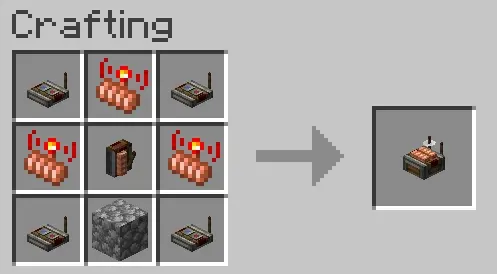
This mod connects Create Redstone Link networks with CC:Tweaked computers. It adds a single block, the CC Redstone Link Bridge, which can be placed in the world and then used as a ComputerCraft peripheral.
This mod requires Create and CC:Tweaked.
What the Mod Does
The bridge acts as a small adapter between two systems:
- Create provides the Redstone Link network.
- CC:Tweaked provides Lua control from computers.
With the bridge block in the world, a connected computer can:
- read the current signal strength of any Redstone Link frequency pair
- send a signal strength to any Redstone Link frequency pair
- optionally tag either frequency slot with a 24-bit RGB dye color
The mod is intentionally minimal. The Lua interface only exposes the operations required for direct network interaction.
How It Works
When the peripheral is used from Lua:
getLinkSignal(freq1, freq2)looks up the current strength for that frequency pair.sendLinkSignal(freq1, freq2, strength)sets the target frequency pair and transmits the chosen strength.
Both functions accept two optional trailing arguments, color1 and color2, which apply a dye color to the corresponding frequency slot.
The frequency values are item IDs written as strings. For example, minecraft:iron_ingot and minecraft:oak_sapling form one valid pair.
Crafting Recipe
Lua API
Peripheral type:
redstone_link_bridge
Methods:
getLinkSignal(freq1, freq2 [, color1 [, color2]])->numbersendLinkSignal(freq1, freq2, strength [, color1 [, color2]])
Frequency Values
freq1 and freq2 must be item IDs as strings.
Examples:
"minecraft:iron_ingot""minecraft:oak_sapling""minecraft:redstone"
Use an empty string ("") if you want to represent an empty frequency value.
Frequency Colors
color1 and color2 are optional 24-bit RGB integers in the form 0xRRGGBB. They are only meaningful when the corresponding frequency item supports Minecraft's DYED_COLOR data component, which is only leather armor and leather horse armor in vanilla. A colored slot is on a different Redstone Link network from an uncolored slot of the same item, and different colors produce different networks.
The Minecraft Wiki Dye page lists the RGB value each of the 16 standard dyes produces when applied to leather armor in Java Edition. Useful values:
0xB02E26-- Red Dye0x3C44AA-- Blue Dye0xFED83D-- Yellow Dye0x5E7C16-- Green Dye0x1D1D21-- Black Dye0xF9FFFE-- White Dye
Pass nil (or simply omit the argument) for a slot that should remain uncolored. To color only the second slot, pass nil for the first.
Example
local bridge = peripheral.find("redstone_link_bridge")
assert(bridge, "No redstone_link_bridge found")

-- Read an existing frequency pair
local current = bridge.getLinkSignal("minecraft:diamond", "minecraft:redstone")
print("Current signal:", current)

-- Send a signal to a frequency pair
bridge.sendLinkSignal("minecraft:diamond", "minecraft:redstone", 7)

-- Send on a color-tagged channel. This matches a physical Redstone Link
-- whose leather-armor slots were dyed with one Red Dye and one Blue Dye.
bridge.sendLinkSignal(
    "minecraft:leather_chestplate",
    "minecraft:leather_helmet",
    15,
    0xB02E26,   -- Red Dye
    0x3C44AA)   -- Blue Dye

-- Only the second slot is colored
bridge.sendLinkSignal(
    "minecraft:leather_chestplate",
    "minecraft:leather_helmet",
    15,
    nil,
    0x3C44AA)   -- Blue Dye
- Edition: Minecraft Java
- File type: .jar
- Minecraft versions listed: 1.21.1, 1.21.2, 1.21.3
- How to install: Install the matching mod loader (Forge, Fabric or NeoForge) for your Minecraft version. → Download the .jar. → Put it in the .minecraft/mods folder and launch that loader profile.
- Where to get it: Opens on Modrinth — not every file is mirrored on our own servers.
Install steps are the general flow for this file type — How to install Minecraft Java mods & modpacks walks through it step by step.
- Ships as cccredstonelink-0.1.1.jar — drop this file into the mods folder
- Download size: 40 KB
- Download link checked 9 Oct 2026 — working
These come from our own check of the pack file, not from the source page.