
Portaldevice
Java mod listed for Minecraft 26.x. Downloads from the MC Java Mods app on Android.
⬇ Download on Modrinth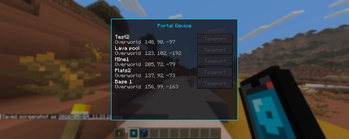
Portal Device Build your own network of teleporters — and travel across your world with a single click. Tired of digging tunnels, building nether highways, or running the same route over and over? Portal Device gives you a personal fast-travel system that you set up entirely yourself, exactly the way you want it. How it works Craft a Portal Device — a handheld unit with a glowing portal screen. Then place Portal Receivers anywhere you like in the world: at your base, down in the mines, by a village, at a friend's place. Name each receiver whatever you want through a simple menu. When you want to travel, pull out your Portal Device, right-click, and you'll see a list of all your receivers. Pick one — and you're there. Features
Handheld Portal Device — your personal remote for teleportation Portal Receivers — place as many as you want, wherever you want Name your destinations — label every receiver so you always find the right one Personal and private — your receivers belong only to you; other players can't use or rename them Dynamic list — break a receiver and it automatically disappears from your list Atmospheric details — portal particles and a faint hum bring your receivers to life Cooldown — teleporting has a cooldown, so it stays balanced instead of feeling like cheating
Good to know Portal Device works in both singleplayer and on servers. On a server, every player needs the mod installed.
- Edition: Minecraft Java
- File type: .jar
- Minecraft versions listed: 26.1, 26.1.1, 26.1.2
- How to install: Install the matching mod loader (Forge, Fabric or NeoForge) for your Minecraft version. → Download the .jar. → Put it in the .minecraft/mods folder and launch that loader profile.
- Where to get it: Opens on Modrinth — not every file is mirrored on our own servers.
Install steps are the general flow for this file type — How to install Minecraft Java mods & modpacks walks through it step by step.
- Ships as portaldevice-1.0.0.jar — drop this file into the mods folder
- Download size: 55 KB
- Download link checked 24 Oct 2026 — working
These come from our own check of the pack file, not from the source page.