
3D maps Voxy Addon
Java mod listed for Minecraft 26.x. File opened and checked on 24 Oct 2026; downloads from the MC Java Mods app on Android.
⬇ Download on Modrinth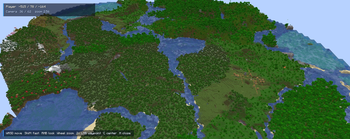

Forget flat, boring minimaps! VoxyMap is an innovative client-side mod that turns your standard world preview into a fully interactive, fullscreen 3D map. By utilizing data from the Voxy mod, you can admire the generated terrain on a massive scale, far exceeding standard Minecraft chunk render distances.
Key Features:
True 3D Experience: The map looks like a massive, three-dimensional preview of your world—no more flat textures!
Massive Render Distance: Rendering is powered by Voxy data, allowing you to seamlessly view huge expanses of terrain.
Smooth Camera Controls: Freely rotate, pan, and zoom the view using your mouse and keyboard.
Client-Side: Works entirely on the client side—no server installation required!
Full support for English, Polish, and Russian languages.

Controls & Usage
- Left mouse button - grab and drag the map.
- Middle mouse button - rotate the camera left or right.
- W/A/S/D or Arrow keys - move the map camera.
- Shift - move faster.
- Mouse wheel - zoom toward the cursor.
- C - center the map on the player.
- M or Esc - close the map.
Requirements & Installation
Game Version: Minecraft 1.21.11
Mod Loader: Fabric Loader & Fabric API
Required Mod: Voxy (best tested with version 0.2.15-beta)
Important!
This mod is not an official add-on by the creator of Voxy!
The mod is not fully finished yet, so bugs may occur. If you find any issues, you can report them on the mod’s GitHub page.
- Edition: Minecraft Java
- File type: .jar
- Minecraft version listed: 26.1.2
- How to install: Install the matching mod loader (Forge, Fabric or NeoForge) for your Minecraft version. → Download the .jar. → Put it in the .minecraft/mods folder and launch that loader profile.
- Where to get it: Opens on Modrinth — not every file is mirrored on our own servers.
Install steps are the general flow for this file type — How to install Minecraft Java mods & modpacks walks through it step by step.
- Ships as VoxyMap-1.1.2.jar — drop this file into the mods folder
- Download size: 442 KB
- Download link checked 10 Oct 2026 — working
These come from our own check of the pack file, not from the source page.