
Cactus ViewModel
View Model is a client-side Fabric mod for Minecraft 1.21.4 that lets you customize the position, rotation, and scale of items held in first-person view…
⬇ Download on Modrinth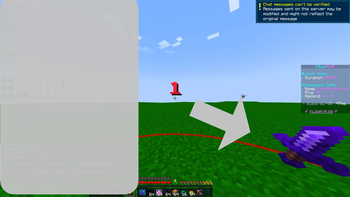
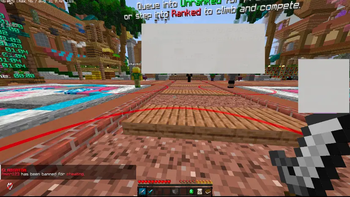
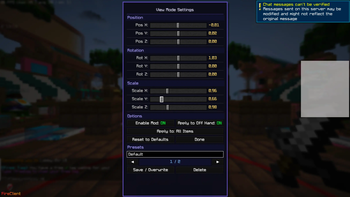
Cactus View Model
Cactus View Model is a client-side Fabric mod for Minecraft 1.21.4 that lets you fully customize how items look in your hand during first-person gameplay. Adjust position, rotation, and scale on all three axes — live, in-game, with no resource packs or external tools required.
What does it add?
Vanilla Minecraft locks item positions in first-person view. Cactus View Model breaks that limitation by giving you a full transform editor built directly into the game.
Features
- 9 transform sliders — fine control over X/Y/Z position, rotation, and scale
- In-game GUI — open anytime with a keybind (default:
V), registered in Minecraft's native Controls screen - Item filter — apply transforms to all items, only swords, only tools, only blocks, or just your currently held item
- Off-hand support — optionally apply transforms to the off-hand slot
- Auto-saving config — settings are stored in
config/viewmode.jsonand loaded instantly on launch - Reset button — one click restores vanilla defaults
- Zero server requirement — works on any server, vanilla or modded
Why download it?
- You want your sword, tool, or block to sit exactly where you want it
- You're a content creator who needs items positioned perfectly on screen
- You play PvP and prefer a specific visual angle for your weapon
- You just want more control over your first-person experience
How to use
- Install Fabric Loader and Fabric API for Minecraft 1.21.4
- Drop the
.jarinto yourmodsfolder - Launch the game and go to Options → Controls to set your keybind
- Press the keybind in-game to open the GUI
- Adjust sliders and hit Done — saved automatically
Client-side only. No server installation needed.
- Edition: Minecraft Java
- File type: .jar
- Minecraft version listed: 1.21.4
- How to install: Install the matching mod loader (Forge, Fabric or NeoForge) for your Minecraft version. → Download the .jar. → Put it in the .minecraft/mods folder and launch that loader profile.
- Where to get it: Opens on Modrinth — not every file is mirrored on our own servers.
Install steps are the general flow for this file type — How to install Minecraft Java mods & modpacks walks through it step by step.
- Ships as viewmode-1.0.0.jar — drop this file into the mods folder
- Download size: 21 KB
- Download link checked 20 Aug 2026 — working
These come from our own check of the pack file, not from the source page.