
HastyHoppers
Java mod listed for Minecraft 26.x. Downloads from the MC Java Mods app on Android.
⬇ Download on Modrinth⚡ HastyHoppers — Fully Configurable Hopper Speeds Tired of slow hoppers? HastyHoppers lets you fully customize hopper transfer speeds with a simple in-game GUI.
🛠 Features
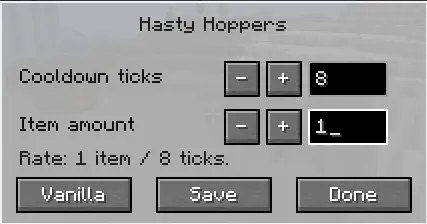
Easy GUI: Run /hastyhoppers in-game to open the settings menu
Custom Hopper Speed: Change how often hoppers transfer items using Cooldown Ticks
Adjust Transfer Amount: Set how many items move per transfer cycle with Items Per Transfer
Per-World Settings: Each world saves its own hopper configuration
Flexible Values: Supports values from 1–64
⚙ How It Works
Cooldown Ticks = how often hoppers transfer items
Items Per Transfer = how many item moves happen each transfer cycle
Lower cooldowns + higher transfer amounts = faster hoppers
📦 Vanilla Comparison
Vanilla Minecraft hoppers move 1 item every 8 ticks by default. With HastyHoppers, you can fine-tune performance to fit your world or server.
Command:
/hastyhoppers — Open the hopper settings GUI in your world.
- Edition: Minecraft Java
- File type: .jar
- Minecraft versions listed: 26.1, 26.1.1, 26.1.2
- How to install: Install the matching mod loader (Forge, Fabric or NeoForge) for your Minecraft version. → Download the .jar. → Put it in the .minecraft/mods folder and launch that loader profile.
- Where to get it: Opens on Modrinth — not every file is mirrored on our own servers.
Install steps are the general flow for this file type — How to install Minecraft Java mods & modpacks walks through it step by step.
- Ships as hastyhoppers-26.1-1.0.0.jar — drop this file into the mods folder
- Download size: 57 KB
- Download link checked 19 Oct 2026 — working
These come from our own check of the pack file, not from the source page.