Quik Unbind
Java mod listed for Minecraft 1.21. Downloads from the MC Java Mods app on Android.
Adds a simple "×" button to the controls menu to instantly unbind keys. No more clicking and pressing Escape—just one click to clear any keybinding.
⬇ Download on Modrinth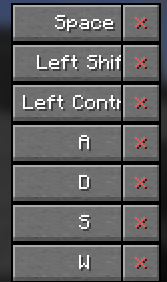
❌ Quick Unbind
Quick Unbind is a lightweight, client-side utility mod that adds a dedicated "Unbind" button to the Minecraft controls menu.
Tired of having to click a keybind, press Escape, or manually hunt through config files just to clear a shortcut? This mod simplifies the process by adding a small, intuitive "×" button next to every keybinding in your options menu.
✨ Features
One-Click Unbind: Clear any keybinding instantly with a single click on the red "×".
Seamless Integration: The button fits perfectly into the vanilla Minecraft UI, located right next to the "Reset" button.
Vanilla Friendly: Uses standard Minecraft logic to ensure your options are saved correctly and instantly updated.
Lightweight: Minimal impact on performance, written with clean Mixins for maximum compatibility.
🛠 How to use
Go to Options > Controls > Key Binds.
Look for the red "×" button next to the Reset button of any entry.
Click it to set the keybind to NONE (Unknown).
- Edition: Minecraft Java
- File type: .jar
- Minecraft version listed: 1.21.11
- How to install: Install the matching mod loader (Forge, Fabric or NeoForge) for your Minecraft version. → Download the .jar. → Put it in the .minecraft/mods folder and launch that loader profile.
- Where to get it: Opens on Modrinth — not every file is mirrored on our own servers.
Install steps are the general flow for this file type — How to install Minecraft Java mods & modpacks walks through it step by step.
- Ships as delete-keybinds-1.0.jar — drop this file into the mods folder
- Download size: 9 KB
- Download link checked 20 Oct 2026 — working
These come from our own check of the pack file, not from the source page.