
FriendsNotes
Player management, built-in messenger and tracking of teammates' HP. Add notes, highlight friends and enemies, monitor the health of your allies in real…
⬇ Download on Modrinth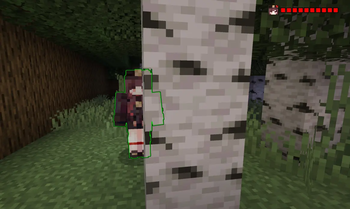
PlayerNotes - Player Management & Team Coordination
PlayerNotes is a comprehensive client-side mod for Minecraft Fabric that helps you track players, communicate with them, and monitor your teammates' health in real-time.
Key Features
Player Management System
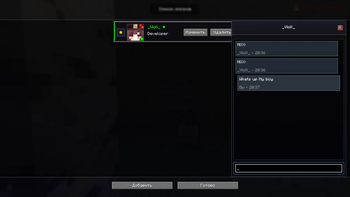
- Add players to your list with custom notes
- Mark players as friends (green highlight) or enemies (red highlight)
- Save important information about each player
- Edit and delete entries anytime
- Reorder players with up/down arrows
Built-in Messenger
- Send private messages directly from the mod interface
- Message history saved for each player
- Convenient interface with auto-scroll to latest messages
- Opens by clicking on a player card
Player Highlighting
- Toggle-able highlighting of friends and enemies through walls
- Green glow for friends, red for enemies
- Automatically hides when players crouch (Shift)
- Hotkey for quick toggle
Favorites System
- Add important players to favorites with a beautiful golden star
- Real-time HP display for favorite players on HUD
- Compact HUD showing player head and health hearts
- Customizable HUD position (4 screen corners)
List Management
- Change player order with up/down arrows
- Beautiful cards with gradients and animations
- Online status indicator
- Player skin display
Commands
/pnhud topleftor/pnhud tl- HUD in top left corner/pnhud toprightor/pnhud tr- HUD in top right corner (default)/pnhud bottomleftor/pnhud bl- HUD in bottom left corner/pnhud bottomrightor/pnhud br- HUD in bottom right corner
Keybindings
Configurable in Minecraft controls settings:
- Open PlayerNotes Menu - opens the main mod menu
- Toggle Highlight - enables/disables player highlighting
Installation
- Install Fabric Loader
- Install Fabric API
- Download PlayerNotes and place in
modsfolder - Launch the game!
Requirements
- Minecraft: 1.21.1
- Fabric Loader: 0.16.5+
- Fabric API: 0.105.0+ (required)
How to Use
- Open the mod menu (configure hotkey)
- Click "Add Player" and enter username
- Select status (friend/enemy/neutral) and add a note
- Click the star to the left of the player's head to add to favorites
- Use arrows to change order (appear on hover)
- Click on a player card to open messenger
Interface Features
- Modern design with gradients and shadows
- Smooth animations and hover effects
- Adaptive interface
- Color-coded player status
- Compact HUD that doesn't clutter the screen
Report a Bug
Found a bug? Have a suggestion? Contact me on Telegram: @viollnon
About the Developer
I'm a beginner programmer learning to create Minecraft mods. This is one of my first projects, and I'm constantly learning and improving. If you have any suggestions, want to report a bug, or just want to chat about the mod, feel free to reach out!
Contact me on Telegram: @viollnon
I appreciate any feedback, bug reports, or feature suggestions. Your input helps me grow as a developer and makes this mod better for everyone!
- Edition: Minecraft Java
- File type: .jar
- Minecraft version listed: 1.21.1
- How to install: Install the matching mod loader (Forge, Fabric or NeoForge) for your Minecraft version. → Download the .jar. → Put it in the .minecraft/mods folder and launch that loader profile.
- Where to get it: Opens on Modrinth — not every file is mirrored on our own servers.
Install steps are the general flow for this file type — How to install Minecraft Java mods & modpacks walks through it step by step.
- Ships as playernotes-1.0.0.jar — drop this file into the mods folder
- Download size: 60 KB
- Download link checked 11 Sept 2026 — working
These come from our own check of the pack file, not from the source page.