![BL Screenshot Gallery [BLSG]](https://cdn.modrinth.com/data/Cdo4b3z6/7e99a08a253af6045451f1e490fd797b34be0899_96.webp)
BL Screenshot Gallery [BLSG]
A modern in-game screenshot gallery for Minecraft that automatically saves where, when, and what biome every screenshot was taken in, with a clean visual…
⬇ Download on Modrinth![BL Screenshot Gallery [BLSG] — screenshot 1](https://cdn.modrinth.com/data/Cdo4b3z6/images/5f60a5dc215e5e370b175a911df82a57e62272ff_350.webp)
![BL Screenshot Gallery [BLSG] — screenshot 2](https://cdn.modrinth.com/data/Cdo4b3z6/images/c94117e44c6d0993b9bc62e931d65efc636fe3ba_350.webp)
![BL Screenshot Gallery [BLSG] — screenshot 3](https://cdn.modrinth.com/data/Cdo4b3z6/images/2dce87b0cde045c7e61e68e5cebc0abc8753f4f4_350.webp)
![BL Screenshot Gallery [BLSG] — screenshot 4](https://cdn.modrinth.com/data/Cdo4b3z6/images/ba7f6e35c6d90e676fe4b524ebf51cb05879efd6_350.webp)
![BL Screenshot Gallery [BLSG] — screenshot 5](https://cdn.modrinth.com/data/Cdo4b3z6/images/502e464280bdeaa31a9b7e8c916ca83cb1cad6bd_350.webp)
BL Screenshot Gallery (BLSG)
A modern in-game screenshot gallery for Minecraft that automatically saves where, when, and what biome every screenshot was taken in — with a clean visual browser directly inside Minecraft.
Perfect for builders, explorers, map makers, SMP players, content creators, and anyone who takes lots of screenshots and later forgets where they were taken.
✨ Features
🖼 In-Game Screenshot Gallery
Press F12 to open a fully integrated screenshot browser without leaving Minecraft.
Features include:
Grid-based gallery view Smooth thumbnail previews Pagination system Search bar Star/favorite screenshots Timeline-style browsing
📍 Automatic Metadata Capture
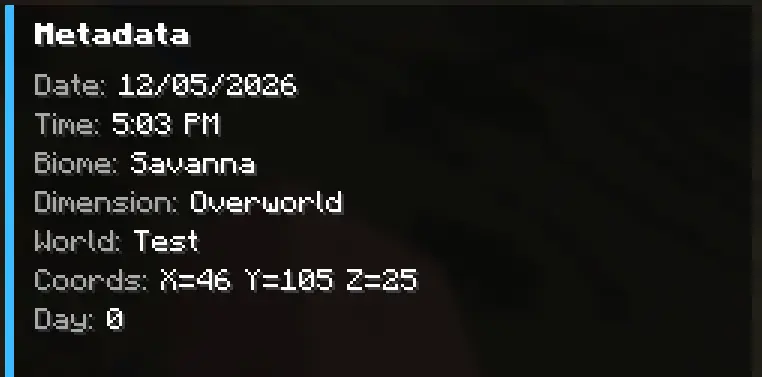
Every screenshot automatically stores:
World / server name Coordinates (X/Y/Z) Biome Dimension Real-world date & time Minecraft in-game day Multiplayer detection Camera rotation (yaw/pitch)
All metadata is saved into lightweight .json sidecar files next to the screenshot.
🔎 Powerful Search
Search screenshots by:
Filename World name Server name Biome Dimension Title Notes
Example searches:
plains
nether
village
my base
survival server
📝 Titles & Notes
Add custom:
Screenshot titles Personal notes Build reminders Lore/context
Titles appear directly on thumbnails for quick identification.
⭐ Favorites System
Star important screenshots and quickly filter them later.
Perfect for:
Favorite builds Coordinates worth revisiting Progress milestones Rare discoveries
🗑 Delete Screenshots In-Game
Delete screenshots directly from the gallery.
BLSG properly removes:
The PNG image Thumbnail Metadata JSON Gallery entry
without needing to restart Minecraft.
🎨 Clean Modern UI
Designed to feel like a native Minecraft feature.
Includes:
Hover effects Dynamic thumbnails Responsive detail screen Metadata panel Large screenshot preview Minimal visual clutter ⚡ Lightweight No external dependencies Minimal memory usage Metadata stored locally Fast thumbnail loading Optimized caching
🧠 Why Use BLSG?
Vanilla Minecraft screenshots become chaotic over time.
BLSG turns them into a searchable visual archive.
Instead of:
"Where did I build that?"
you get:
"Oh yeah — Plains biome, Day 184, SMP world."
📦 Metadata Example
⌨ Default Keybind
Action Key Open Gallery F12
(Keybind can be changed in Minecraft Controls settings.)
🔧 Supported Loader
Fabric
- Edition: Minecraft Java
- File type: .jar
- Minecraft version listed: 1.21.9
- How to install: Install the matching mod loader (Forge, Fabric or NeoForge) for your Minecraft version. → Download the .jar. → Put it in the .minecraft/mods folder and launch that loader profile.
- Where to get it: Opens on Modrinth — not every file is mirrored on our own servers.
Install steps are the general flow for this file type — How to install Minecraft Java mods & modpacks walks through it step by step.
- Ships as bl-screenshot-gallery-1.0.0.jar — drop this file into the mods folder
- Download size: 44 KB
- Download link checked 8 Sept 2026 — working
These come from our own check of the pack file, not from the source page.