
Coolite
⚠it does not work with lunar client
A lightweight Fabric client-side mod that displays item cooldowns as a HUD overlay.
Designed for servers using custom cooldown systems via the Apollo protocol.
Features
- Cooldown HUD — Shows active item cooldowns with a progress bar and remaining time
- Custom Model Data support — Renders the correct custom item texture when a CMD is assigned
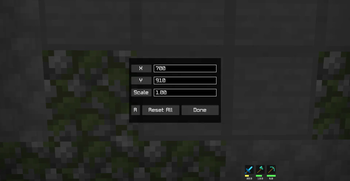
- Configurable position & scale — Place the HUD anywhere on screen
- Left / Right layout — Choose whether the HUD grows to the right or to the left
Usage
| Action | Description |
|---|---|
/coolite |
Open the config screen |
| Mod menu | Click the config button on the Coolite entry in Mod Menu |
Config options
| Option | Description |
|---|---|
| X / Y | HUD position as a 0–1000 screen ratio |
| Scale | HUD size multiplier (0.1–10.0) |
| L / R | Direction the HUD expands toward |
Note: The default HUD position may not suit your screen resolution or GUI scale. It is strongly recommended to open the config screen and adjust the position and scale to fit your setup before playing. The config screen shows a live preview so you can fine-tune it in real time.
Requirements
- Minecraft 1.21.x
- Fabric Loader
- Fabric API
- Mod Menu (optional — for in-game config access)
Notes
This mod is intended for use on specific servers that send cooldown data via the Apollo protocol. It will not display anything on servers that do not support this.
- Edition: Minecraft Java
- File type: .jar
- Minecraft version listed: 1.21.11
- How to install: Install the matching mod loader (Forge, Fabric or NeoForge) for your Minecraft version. → Download the .jar. → Put it in the .minecraft/mods folder and launch that loader profile.
- Where to get it: Opens on Modrinth — not every file is mirrored on our own servers.
Install steps are the general flow for this file type — How to install Minecraft Java mods & modpacks walks through it step by step.
- Ships as Coolite-1.1.jar — drop this file into the mods folder
- Download size: 2.5 MB
- Download link checked 7 Sept 2026 — working
These come from our own check of the pack file, not from the source page.