
Day Counter by Niruki
Adds a small pixel-art calendar at the top-left of your screen showing the current day of your world. Fully customizable color, size, and position.
⬇ Download on Modrinth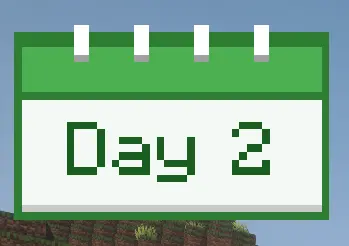
Day Counter Ever lost track of how long you've been playing your world? Day Counter shows your current Minecraft day in a tiny pixel-art calendar at the top-left of your screen — styled like a real wall calendar with a spiral binding and a colored header.
Features
Wall-calendar design — colored header, white page, and little spiral binding rings on top
Live day counter — reads the current day directly from your world, no setup required
9 color themes — green (default), red, yellow, blue, purple, pink, orange, dark green, turquoise
Adjustable size — scale from 0.5× to 6× to match your UI
Repositionable — move the overlay to any pixel offset from the top-left corner
Toggle the header & text shadow — fine-tune the look
Persistent settings — saved to config/daycounter-client.toml, survives restarts
- Edition: Minecraft Java
- File type: .jar
- Minecraft version listed: 1.20.1
- How to install: Install the matching mod loader (Forge, Fabric or NeoForge) for your Minecraft version. → Download the .jar. → Put it in the .minecraft/mods folder and launch that loader profile.
- Where to get it: Opens on Modrinth — not every file is mirrored on our own servers.
Install steps are the general flow for this file type — How to install Minecraft Java mods & modpacks walks through it step by step.
- Ships as daycounter-1.20.1-1.0.0.jar — drop this file into the mods folder
- Download size: 12 KB
- Download link checked 22 Aug 2026 — working
These come from our own check of the pack file, not from the source page.