
PixelSight
PixelSight is a professional in-game editor for Minecraft 1.20.1 that allows you to draw your own 16x16 pixel crosshair with full RGB color support. By…
⬇ Download on Modrinth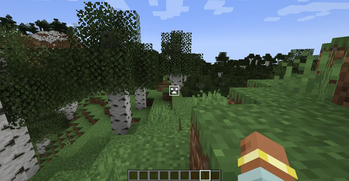
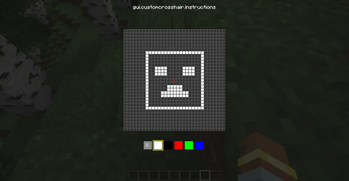
PixelSight is a lightweight and powerful utility mod for Minecraft 1.20.1 that gives you total control over your aiming experience. Forget about boring standard crosshairs — now you can draw your own pixel by pixel!
Key Features:
In-Game Editor: No need to mess with texture packs or restart the game. Press "Period" (Ю) to open the 16x16 drawing grid.
RGB Color Picker: Use the built-in color controls to create a crosshair in any color you want. Want it neon pink? Or classic lime green? It's up to you!
Clean Experience: The mod automatically hides the vanilla Minecraft crosshair, ensuring your custom creation is the only thing on your screen.
Real-Time Updates: Your changes are applied instantly the moment you close the editor.
How to use:
Enter your world.
Press the "> ." key on your keyboard.
Click on the pixels to draw your shape and use the RGB labels to adjust the color.
Press ESC to save and dominate!
- Edition: Minecraft Java
- File type: .jar
- Minecraft version listed: 1.20.1
- How to install: Install the matching mod loader (Forge, Fabric or NeoForge) for your Minecraft version. → Download the .jar. → Put it in the .minecraft/mods folder and launch that loader profile.
- Where to get it: Opens on Modrinth — not every file is mirrored on our own servers.
Install steps are the general flow for this file type — How to install Minecraft Java mods & modpacks walks through it step by step.
- Ships as MyCustomCrosshair.jar — drop this file into the mods folder
- Download size: 11 KB
- Download link checked 21 Aug 2026 — working
These come from our own check of the pack file, not from the source page.