HomeJavaModsSimplified Backpacks
Simplified Backpacks
Simplified Backpacks — screenshot 1

Simplified Backpacks!

Support

This mod needs Trinkets Updated to work! For 1.21.8, use Trinkets Canary.

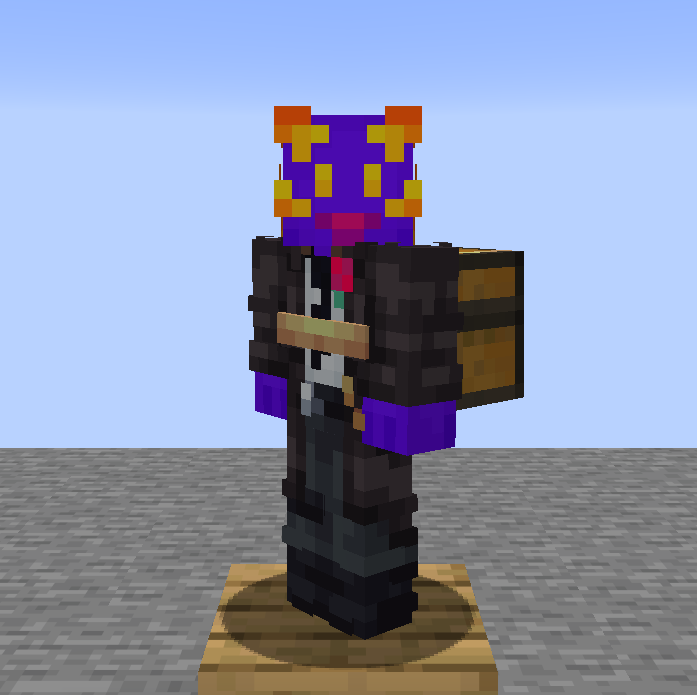
Simplified Backpacks adds a simple Backpack, which can be upgraded to various tiers, with each one increasing the amount of rows in the backpack!

A Backpack resembling a tiny Chest sitting on some Oak Planks.

Backpacks are placeable by sneaking and right-clicking on a block. You can pick them back up by either sneaking and right-clicking, or by breaking the Backpack block.

Translation Credits

English, German, Pirate Speak and LOLCAT by flingus

English (Upside Down), Shakespearean English, Anglish by skyrpy

Russian by HafniuMark

Addons

Backpacks can have Addons, which give a new function to each Backpack that has one. Backpacks can only contain one Addon at a time, without commands.

Sorting

The Sorting Backpack Addon adds two buttons.

Magnetic

The Magnetic Backpack Addon also adds two buttons.

The filter filters picked up items into the Backpack if the Backpack contains atleast one of the item you picked up.

Both of these Addons are sold by Leatherworker Villagers.

To apply these, place them inside of a Smithing Table along with the Addon's desired smithing item.

Examples for applying an Addon to a Backpack

Applying an Addon will get rid of any other Addons on the Backpack!

Upgrades

Each Backpack has a Tier they can upgrade to. To upgrade, you need an Upgrade Template of the Tier and its corresponding item.

The Backpack Upgrade Base is sold by a Leatherworker Villager aswell, but you can duplicate it by crafting one with any type of Planks and Leather.

Backpack Upgrade Base recipe, containing any type of Planks in the center, an existing Upgrade Base at the top, and Leather in a U formation around the two other ingredients.

To craft an upgrade for a new Tier, you can either use eight of the Tier's material, or four of the material but with the previous Tier's upgrade template.

Emerald Backpack Upgrade recipes

Tiers

Generic

The classic backpack!

This tier has 1 row of slots you can put stuff in.

The GUI Item texture of the Backpack Recipe of a Backpack, containing leather, two string, and a chest.

Copper

Second Tier

This tier has 2 rows of slots you can put stuff in.

The GUI Item texture of the Copper Backpack Smithing recipe of a Copper Backpack, containing a Copper Backpack Upgrade Template, a Backpack and a Copper Ingot.

Iron

Third Tier

This tier has 3 rows of slots you can put stuff in.

The GUI Item texture of the Iron Backpack Smithing recipe of an Iron Backpack, containing a Iron Backpack Upgrade Template, a Copper Backpack and an Iron Ingot.

Emerald

Fourth Tier

This tier has 4 rows of slots you can put stuff in.

The GUI Item texture of the Emerald Backpack Smithing recipe of an Emerald Backpack, containing an Emerald Backpack Upgrade Template, an Iron Backpack and an Emerald.

Diamond

Fifth Tier

This tier has 6 rows of slots you can put stuff in.

The GUI Item texture of the Diamond Backpack Smithing recipe of a Diamond Backpack, containing a Diamond Backpack Upgrade Template, an Emerald Backpack and a Diamond.

Netherite

Sixth Tier

This tier has 7 rows of slots you can put stuff in, and won't burn in lava.

The GUI Item texture of the Netherite Backpack Smithing recipe of a Netherite Backpack, containing a Netherite Upgrade Smithing Template, a Diamond Backpack and a Netherite Ingot.

Quick facts

Install steps are the general flow for this file type — How to install Minecraft Java mods & modpacks walks through it step by step.

Verified by MCModsHub

These come from our own check of the pack file, not from the source page.

Explore more