SulfiDish Radio
A beautiful Touhou-inspired Minecraft radio HUD mod for Gensokyo Radio with live track info, adaptive album art, visualizer, customizable layout, and full…
⬇ Download on Modrinth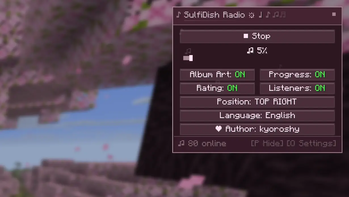
SulfiDish Radio 🎵
SulfiDish Radio — A fan-made Minecraft mod dedicated to the beloved Gensokyo Radio, the finest Touhou music station.
This mod brings the magic of Gensokyo Radio directly into your Minecraft experience with a beautiful anime-styled HUD overlay that dances to the rhythm of Touhou music. And they dynamically change their interface to match the album cover.
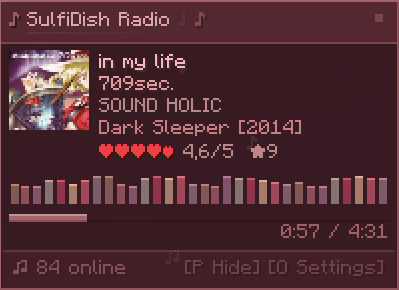
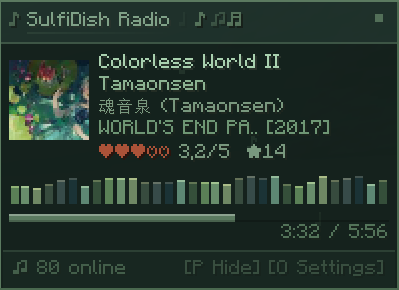
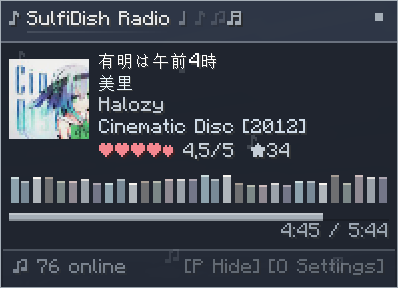
Features:
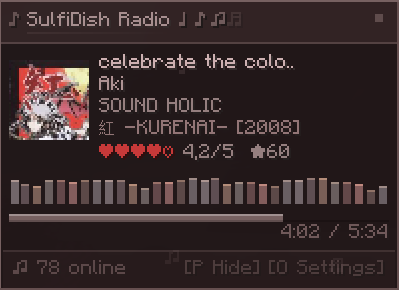
Real-time track info — song title, artist, album, circle, and year displayed live
Adaptive album art — cover art is fetched and rendered with smooth levitation animation, and the entire HUD color scheme dynamically adapts to the album's palette
Audio visualizer — a colorful bar visualizer that pulses with the music, themed to match the current album art
Smooth jelly-like notifications — track changes, connection events, pause/resume — all delivered with gentle floating and soft blink animations Pause & resume controls — stop and start the radio stream at any time with instant feedback
Progress bar — see how far into the current song you are, with elapsed/remaining time
Listener count — see how many others are tuned in
Customizable layout — 4 position options (top-left, top-right, bottom-left, bottom-right)
Toggleable elements — album art, progress bar, listeners count, and rating can each be turned on/off
Bilingual interface — full Russian and English support, switchable in-game 💗


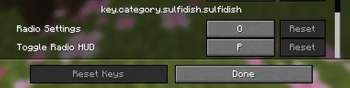
Toggle HUD visibility (default: H) Toggle settings menu (default: J) All keybinds are configurable in Minecraft's controls settings.
IMPORTANT 💡
This is an unofficial fan project and is not affiliated with Gensokyo Radio.
Personally, I absolutely love this radio stream—I’ve been listening to it for a couple of years now. I was originally inspired by CraftGR, and I’ll include a link to them here because I really respect them; they deserve all the credit, and I’ve simply followed in the footsteps of this wonderful mod, so be sure to check out their mod.
SpoilerNew streams (radio) will be added in the future - or perhaps they have already been added.
- Edition: Minecraft Java
- File type: .jar
- Minecraft version listed: 26.2
- How to install: Install the matching mod loader (Forge, Fabric or NeoForge) for your Minecraft version. → Download the .jar. → Put it in the .minecraft/mods folder and launch that loader profile.
- Where to get it: Opens on Modrinth — not every file is mirrored on our own servers.
Install steps are the general flow for this file type — How to install Minecraft Java mods & modpacks walks through it step by step.
- Ships as [Fabric] SulfiDish Radio 2.8.jar — drop this file into the mods folder
- Download size: 1.2 MB
- Download link checked 26 Sept 2026 — working
These come from our own check of the pack file, not from the source page.