Features
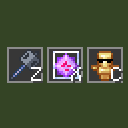
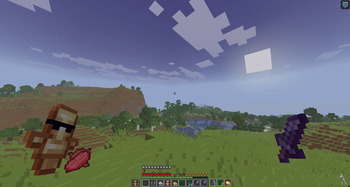
Instant hotbar selection — press a key, the slot with that item gets selected immediately Unlimited binds — configure as many item→key pairs as you need HUD overlay — shows all your binds as item slots with key labels, just like the vanilla hotbar Draggable HUD — reposition the overlay anywhere on screen
How to use
- Open Mod Menu and click Config on ItemKeybind
- Add a bind: enter an item ID (e.g. minecraft:end_crystal) and a key (e.g. key.keyboard.z)
- Press Save & Close
- In-game, press your configured key to instantly switch to that item in your hotbar. If the item is not in your hotbar, nothing happens.
Quick facts
- Edition: Minecraft Java
- File type: .jar
- Minecraft version listed: 1.21.11
- How to install: Install the matching mod loader (Forge, Fabric or NeoForge) for your Minecraft version. → Download the .jar. → Put it in the .minecraft/mods folder and launch that loader profile.
- Where to get it: Opens on Modrinth — not every file is mirrored on our own servers.
Install steps are the general flow for this file type — How to install Minecraft Java mods & modpacks walks through it step by step.
Verified by MCModsHub
- Ships as ItemKeybind-1.0-SNAPSHOT.jar — drop this file into the mods folder
- Download size: 44 KB
- Download link checked 10 Sept 2026 — working
These come from our own check of the pack file, not from the source page.