
ModsJava
Mobs Optimized Render
Java mod listed for Minecraft 1.16. Downloads from the MC Java Mods app on Android.
⬇ Download on Modrinth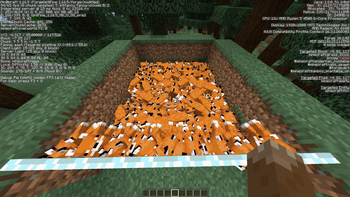
Mobs Optimized Render
Mobs Optimized Render is a lightweight Forge mod designed to drastically improve your FPS by culling entities that are not visible to you.
By skipping the rendering of mobs hidden behind blocks, the client can save a massive amount of resources, especially in areas with dense entity populations like mob farms.
🚀 Massive Performance Boost
In our tests, the difference is night and day:
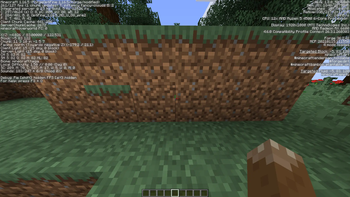
- Baseline (Looking at 100+ mobs): ~94 FPS
- Optimized (Mobs behind a wall): ~261 FPS
- That's a ~177% FPS increase!
✨ Key Features
- Smart Occlusion Culling: We don't just check one point. The mod traces lines to the eyes, feet, and center of every entity. If even a tiny part of the mob is visible, it stays rendered.
- Visual Transparency Support: Uses
VISUALraytracing, meaning you can still see mobs through glass, water, and other transparent blocks. - Client-Side Only: Works on any server! No server-side installation needed.
Stop wasting frames on things you can't see!
Quick facts
- Edition: Minecraft Java
- File type: .jar
- Minecraft version listed: 1.16.5
- How to install: Install the matching mod loader (Forge, Fabric or NeoForge) for your Minecraft version. → Download the .jar. → Put it in the .minecraft/mods folder and launch that loader profile.
- Where to get it: Opens on Modrinth — not every file is mirrored on our own servers.
Install steps are the general flow for this file type — How to install Minecraft Java mods & modpacks walks through it step by step.
File checked by MCModsHub
- Ships as mobculler-1.0.1.jar — drop this file into the mods folder
- Download size: 4 KB
- Download link checked 21 Oct 2026 — working
These come from our own check of the pack file, not from the source page.